Ezora logo
Ezora
Blog
Book a call
Ezora
© Ezora 2026. All rights reserved.
< All posts

How to Set Up an AI WhatsApp Agent for Lead Follow-Up (Step-by-Step Guide for 2026)

Discover how to set up an AI WhatsApp agent for lead follow-up with this comprehensive step-by-step guide for 2026, tailored for your business needs.

·Updated November 6, 2026·15 min read
How to Set Up an AI WhatsApp Agent for Lead Follow-Up (Step-by-Step Guide for 2026)

how to set up an AI WhatsApp agent for lead follow-up | updated November 6, 2026 | Ezora Team | 2-3 weeks (setup) + ongoing optimization | Beginner

What You'll Learn

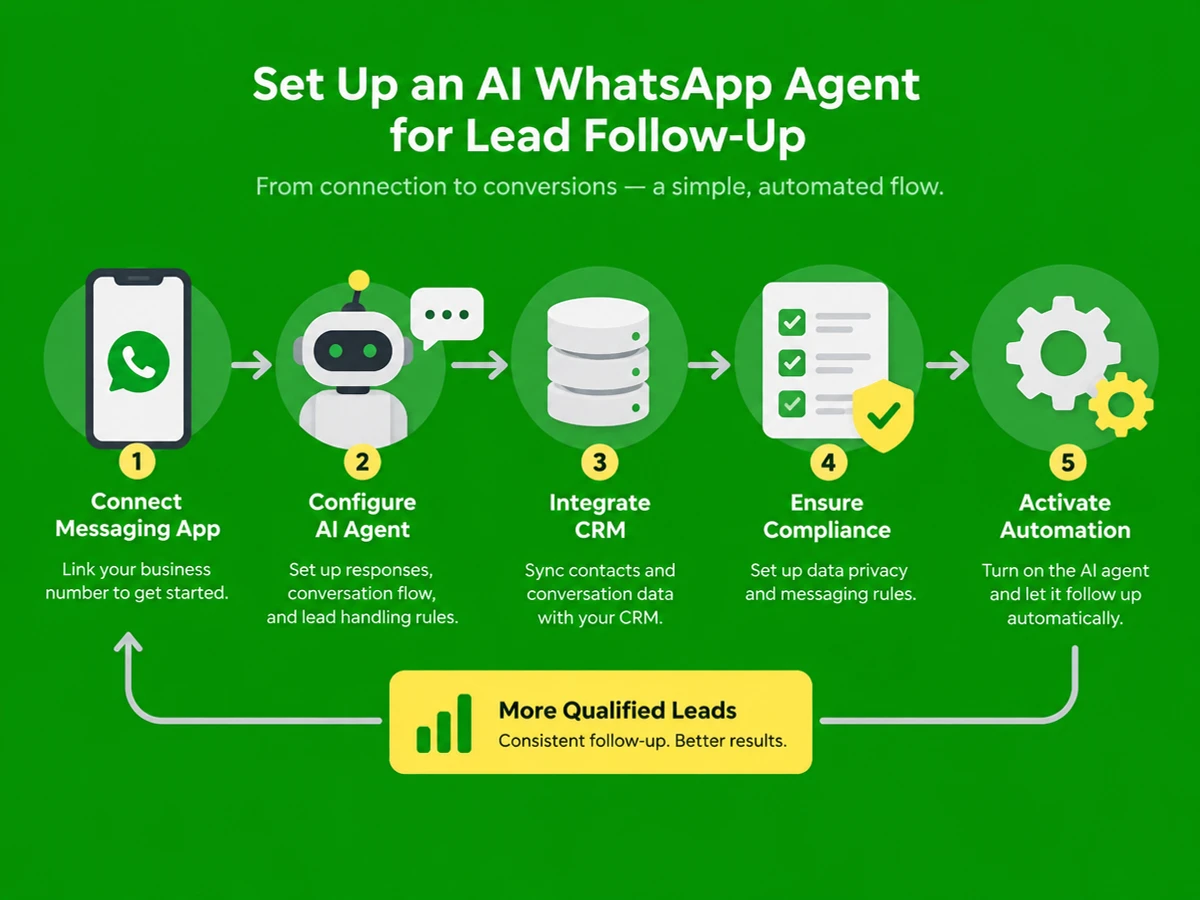
This guide walks you through how to set up an AI WhatsApp agent for lead follow-up in 2026. You'll connect the official WhatsApp Business API and build a compliant, always-on conversation flow that qualifies and nurtures leads without someone babysitting the inbox. The process has five steps: provider setup, compliant messaging design, AI conversation logic, CRM integration, and launch with monitoring. It's especially relevant for real estate agencies, insurance providers, rental management companies, and home services businesses in India, where lead qualification agents respond in seconds, compared with the 3-6 hour average for human follow-up.

  • How to pick a WhatsApp Business Platform provider and get your number approved by Meta
  • How to design opt-in and template message flows that stay compliant with Meta and India's DPDP Act, the Digital Personal Data Protection Act
  • How to build an AI conversation flow that qualifies leads and books appointments without manual input
  • How to connect the agent to your CRM so no lead ever sits unanswered

Prerequisites: a registered business (GST or equivalent), a dedicated phone number not tied to a personal WhatsApp account, a Meta Business Manager account, and a basic lead source such as a website form, ad campaign, or listing portal.


Why Setting Up an AI WhatsApp Agent Matters in 2026

Speed is now the biggest lever on conversion. Leads answered in under one minute convert 8 times more often than those answered after five minutes, and every extra minute of delay trims the chance of closing by 3 to 5%. In India, a lead that waits until the next morning is 21 times less likely to convert than one answered within five minutes.

The gap between businesses using the basic WhatsApp Business app and those running an AI agent on the official API is structural, not incremental. Indian businesses using the WhatsApp Business API with automation see 3 to 5 times higher lead conversion than email, along with a 3x increase in leads followed up within 60 seconds and 40 to 60% less manual team time spent on first-stage qualification. Over 5 million businesses now use the WhatsApp API for customer engagement. Manual handling is no longer a cost-saving choice. It's a competitive disadvantage.

For real estate, insurance, and rental businesses, the stakes are higher still. Leads are expensive and go cold fast. An AI WhatsApp agent closes the response gap, nurtures leads that go quiet, and hands your team only the conversations that need a human.

Key Takeaway: An AI WhatsApp agent helps you reach sub-minute response times, lift conversion, and stay ahead of competitors still relying on manual follow-up. For supporting data, see AI sales tools for WhatsApp: the 2026 buyer's guide.


Missing calls after hours?

Book a 20-minute call. We'll show you where leads slip through and what an AI front office would answer, book and follow up for you.

Book a call

The Process at a Glance

StepActionTimeOutcome
1Choose a WhatsApp Business API provider and verify your number3-7 business daysApproved WhatsApp Business Platform number live
2Design compliant opt-in flow and message templates2-4 daysMeta-approved templates ready to send
3Build the AI agent's qualification and follow-up logic3-5 daysAutomated conversation flow that qualifies leads
4Connect the agent to your CRM and lead sources1-3 daysLeads auto-route into WhatsApp within seconds
5Test, launch, and monitor performanceOngoing from day 1Live agent with reporting on replies and bookings

Total time to launch: roughly 2-3 weeks from provider signup to a fully live, tested agent, assuming Meta's business verification doesn't stall.


Step 1: Choose a WhatsApp Business API Provider and Verify Your Number

What You're Doing

You're moving business messaging off the free WhatsApp Business app and onto the WhatsApp Business Platform (API). It's the only version that legally supports automation, chatbots, and AI agents at scale.

How to Do It

  1. Set up or confirm your Meta Business Manager account, the central hub for managing your Meta business assets, and upload your verified business documents.
  2. Pick a Business Solution Provider (BSP), a third-party vendor authorized by Meta to offer WhatsApp Business Platform services. An all-in-one platform like Ezora handles both the API connection and the AI agent layer, so you aren't stitching together separate tools.
  3. Provision a dedicated business number. It can't be an active personal WhatsApp number. It needs to be newly registered or migrated specifically for the API.
  4. Submit for Meta's business verification. Benchmark data from WhatsApp API accounts shows that guided onboarding to the first production broadcast averages 5 to 7 business days, and verification can add another 3 to 5 days.

Best Practices

  • Use a number your customers already see on business cards or listings. A brand-new number can confuse people.
  • Choose a provider with human handoff, not just a chatbot, so complex questions reach your team without friction.

Common Mistakes

The most expensive mistake is automating messages from a personal WhatsApp account with unofficial bulk-sender tools. Automating the personal app risks a permanent ban, which can wipe out your lead pipeline overnight.

What Done Looks Like

You have a verified, Meta-approved number connected to your provider, ready to send and receive messages programmatically.

Key Takeaway: Moving to the official platform through a Meta-approved provider, and getting verified, is the foundation for everything that follows. For a more detailed walkthrough, see WhatsApp AI Agent for Business | Answers, Qualifies ....


Step 2: Design a Compliant Opt-In Flow and Message Templates

What You're Doing

Your agent can't message a lead until you've captured consent properly and built a library of Meta-approved templates. This is the step most Indian businesses get wrong, and the one most likely to get a number banned or throttled. Getting it right now saves a painful rebuild later.

How to Do It

  1. Add an unticked WhatsApp opt-in checkbox to every lead capture point: website forms, Click-to-WhatsApp ads, QR codes, and landing pages. A pre-ticked box or a buried terms-of-service clause doesn't count as valid consent.
  2. Store the opt-in source and timestamp for every contact. Harvesting numbers and messaging cold violates WhatsApp's commerce policy and risks a permanent ban.
  3. Draft templates across Meta's three categories: utility (appointment confirmations, document reminders), marketing (offers, re-engagement), and authentication (OTPs). Utility messages cover things like order confirmations and payment reminders tied to a transaction, while marketing templates face much stricter review.
  4. Submit templates for Meta review. Approval usually takes 24 to 72 hours.
  5. Build an opt-out trigger (keywords such as "STOP") that halts further messages immediately. Opt-out requests must be honored right away.

Example

Template CategoryUse CaseExample Trigger
UtilitySite visit confirmation for a property leadLead books a viewing
MarketingRe-engagement after 7 days of silenceNo reply to initial follow-up
AuthenticationVerify phone number before sharing quoteInsurance quote requested

What Done Looks Like

Every contact has a documented opt-in trail, your approved templates cover your main lead scenarios, and the opt-out path is built in from day one.

Key Takeaway: Clear opt-in and Meta-approved templates aren't optional. They keep your agent legal and your account in good standing.


Step 3: Build the AI Agent's Qualification and Follow-Up Logic

What You're Doing

This is where the "AI" earns its keep. The agent asks qualifying questions, handles objections, and keeps following up until the lead books or opts out. A static, one-and-done chatbot script can't do that.

How to Do It

  1. Map your qualification sequence. For real estate, that's budget, timeline, and location preference. For insurance, policy type and coverage need. For rentals, move-in date.
  2. Configure the agent, such as those built on Ezora, to ask these questions in natural conversation rather than a rigid form. It should notice when a lead goes quiet and trigger a follow-up sequence automatically.
  3. Set a persistence rule. Follow up at defined intervals, for example same day, day 3, and day 7, until the lead books, declines, or opts out. This pays off: a single follow-up lifted booked calls from 8.66% to 17.84%, a 106% increase among engaged leads.
  4. Build an escalation rule so high-intent replies (such as "I want to book a viewing today") go straight to a human agent.

Best Practices

  • Keep the tone conversational and specific to your industry. Leads who exchange 11 or more messages qualify at a far higher rate than those who receive one scripted reply.
  • Cap follow-up frequency to avoid fatigue. A single user can receive no more than 2 marketing messages per day from any business.

What Done Looks Like

The agent holds a full qualification conversation unassisted, knows when to hand off, and re-engages leads who stop responding, all within Meta's messaging limits.

Key Takeaway: An effective agent qualifies leads, handles objections, follows up persistently, and knows when to pass the conversation to a person.


Step 4: Connect the Agent to Your CRM and Lead Sources

What You're Doing

An agent is only as fast as the pipeline feeding it. This step ensures a new enquiry from any channel reaches WhatsApp in seconds, not hours. It's unglamorous plumbing, but it decides whether everything else works.

How to Do It

  1. Connect your website forms, Click-to-WhatsApp ads, and listing portals so every new lead triggers an instant WhatsApp greeting.
  2. Sync conversation data back to your CRM, the Customer Relationship Management system that stores lead data and interactions, in real time, so reps see qualification answers without asking the lead again.
  3. Set the response SLA inside the integration. Industry playbooks recommend a 60-second SLA built as: form submit, auto-greeting sent, qualification script, rep notification, CRM entry.
  4. Test the full loop end to end. Submit a test lead and confirm WhatsApp delivery, CRM logging, and human notification all fire correctly.

Common Mistakes

A common error is connecting only the main lead form and forgetting secondary sources like Facebook Lead Ads or portal referrals. Those gaps are where leads still wait hours. Skipping the CRM sync is another mistake, since it forces reps to copy qualification data by hand.

What Done Looks Like

Every lead source triggers an AI WhatsApp reply within about 60 seconds, and conversation data appears in your CRM without anyone touching it.

Key Takeaway: Connecting every lead source and your CRM makes instant engagement possible and gives your sales team qualified, up-to-date data.


Step 5: Test, Launch, and Monitor Performance

What You're Doing

Before going fully live, test the agent against realistic scenarios and set up reporting. You'll see what's working and catch compliance issues while they're still cheap to fix.

How to Do It

  1. Run a soft launch with a small batch of real or seeded leads covering your main scenarios: hot lead, cold lead, objection, and opt-out request.
  2. Check template delivery rates, response accuracy, and whether the opt-out flow actually stops messages.
  3. Turn on full reporting. Track response time, reply rate, qualification rate, and bookings per week. Platforms like Ezora generate real-time reports, so you don't have to build dashboards yourself.
  4. Expand to all lead sources once the soft launch numbers look healthy.

What Done Looks Like

The agent is live across every lead source, you get a weekly report on response time and qualification, and your team steps in only for conversations that genuinely need a person.


What to Do After Setting Up Your AI WhatsApp Agent

Phase 1 (Weeks 1-4): Stabilize. Watch your template quality ratings, fix drop-offs in the qualification script, and confirm opt-out requests are honored every time.

Phase 2 (Months 2-3): Optimize. A/B test your greeting and follow-up cadence, add seasonal templates, and refine qualifying questions based on which ones actually predict bookings.

Phase 3 (Month 4 onward): Scale. Extend the agent logic to SMS or voice follow-up for leads who don't engage on WhatsApp, and tie WhatsApp conversations directly to closed deals or policies sold.


Resources You'll Need

These are the key resources for setting up an AI WhatsApp agent for lead follow-up: See also, see WhatsApp AI Agent: How to Choose and Set Up One for ....

ResourceRoleRequirement LevelPrice
EzoraAI agent platform for WhatsApp/SMS lead follow-up, CRM sync, and reportingRecommendedCustom pricing, live in about 2 weeks
Meta Business ManagerBusiness verification and WhatsApp Business Platform accessRequiredFree
WhatsApp Business Platform (API)Underlying messaging infrastructure for automationRequiredPer-message, by template category
CRM (e.g., your existing lead management tool)Stores lead data and conversation historyRecommendedVaries
Click-to-WhatsApp ad campaignsHigh-intent lead source feeding the agent directlyOptionalAd spend dependent

Common Plateaus & How to Break Through

Problem: Templates keep getting rejected by Meta

Likely cause: The copy reads as promotional even though it's labeled as a utility template. Meta judges templates by what the user expects to receive, not by your stated intent.

Fix: Rewrite the template around a specific transaction, such as a booked viewing or requested quote, instead of general sales language.

Problem: Leads stop responding after the first message

Likely cause: You've configured only one follow-up, or it arrives too late, outside the engagement window.

Fix: Build a multi-touch sequence. A single follow-up nearly doubles booked calls among engaged leads, so persistence within Meta's frequency limits matters more than one perfect message.

Problem: Response time is still slow despite automation

Likely cause: The agent is connected to only one lead source, so leads from ads, portals, or referrals still wait for manual routing.

Fix: Audit every entry point and connect each one to the same 60-second auto-response flow, not just the main website form.

Problem: Number gets flagged or quality rating drops

Likely cause: You're messaging contacts without clear opt-in records, or exceeding marketing frequency limits.

Fix: Audit the opt-in source log for every contact, cap marketing messages at Meta's limit, and make sure opt-out requests are processed immediately.

Key Takeaway: Template rejections, weak engagement, slow responses, and compliance flags trace back to a few fixable causes. Knowing Meta's policies and tuning the agent regularly keeps them under control. For more troubleshooting advice, see WhatsApp Sales Automation with AI: A Practical Guide.


Conclusion

Setting up an AI WhatsApp agent for lead follow-up in 2026 comes down to five steps: connect the official WhatsApp Business API, design compliant opt-ins and templates, build the AI's qualification logic, integrate with your CRM and lead sources, and launch with ongoing monitoring. Done well, follow-up stops being a slow, manual chore. It responds in seconds and keeps going until the lead books or opts out.

Key Takeaways

  • A well-configured AI WhatsApp agent can cut response time from hours to under a minute, directly improving qualification and booking rates.
  • Compliance (valid opt-in, approved templates, honored opt-outs) isn't optional. It decides whether your number stays usable long term.
  • Your next step is to choose a provider, whether a BSP or an integrated platform like Ezora, and start Meta verification this week.

FAQ

How do I set up an AI WhatsApp agent for lead follow-up in 2026?

Connect a verified number to the official WhatsApp Business Platform (API) through a provider. Design compliant opt-in flows and Meta-approved templates, build the AI's logic to qualify leads and follow up automatically, and link it to your CRM and lead sources. Test and monitor before full launch. The whole process usually takes 2 to 3 weeks. Platforms like Ezora can have an industry-specific agent live in about two weeks, without staff retraining.

Do I need the WhatsApp Business API, or is the free app enough?

The free app can't support real automation or AI agents at scale. Chatbots, broadcasts, and order updates all require the official WhatsApp Business API, and automating the personal app risks a permanent ban.

How much does an AI WhatsApp agent cost to run in India?

There are two cost layers: the platform or BSP fee, and Meta's per-message charges. Those vary by template category (utility, marketing, authentication) and by recipient country code. You're charged only when a template message is delivered. Utility templates are usually the cheapest and have the highest approval rates.

Is opt-in really required before sending WhatsApp follow-up messages?

Yes. Opt-in is mandatory for every business-initiated message. A pre-ticked checkbox or a past purchase doesn't count as valid consent. Every contact you message must have explicitly agreed to receive WhatsApp messages from your business.

What happens if a lead doesn't reply within 24 hours?

Once the 24-hour customer service window closes, you can't send free-form replies. You'll need a pre-approved template to restart the conversation, which is why utility and re-engagement templates should be ready in advance.

How many follow-up messages should an AI agent send before giving up?

Most effective sequences use 2 to 4 follow-ups spread over one to two weeks. A single follow-up alone nearly doubles booked calls among engaged leads, and cadence should stay within Meta's daily marketing limits for each user.

Can an AI WhatsApp agent fully replace my sales team?

No. It's built to handle first-response speed and routine qualification, not complex or high-value conversations that need human judgment. The agent should escalate high-intent or complicated replies to a rep. That's the model Ezora uses with real estate, insurance, rental, and home services clients.

Which industries benefit most from AI WhatsApp lead follow-up?

Businesses with time-sensitive, high-volume enquiries see the biggest gains, including real estate agencies, insurance providers, rental management companies, and home services businesses. Qualification agents respond in seconds, while manual follow-up can take hours, and that gap translates directly into more booked appointments.

Methodology: This guide draws on publicly available 2026 WhatsApp Business API documentation, industry benchmark reports, and Meta's published messaging policies as of the update date above. Statistics come from third-party research and may vary by market, industry, and implementation. Verify current Meta pricing and compliance requirements directly before launch.

Missing calls after hours?

Book a 20-minute call. We'll show you where leads slip through and what an AI front office would answer, book and follow up for you.

Book a call
Social Share
Add as a preferred source on Google
Social Share
Add as a preferred source on Google
Ezora logoEzora

Every call answered. Every lead followed up.

Book a 20-minute call to see what Ezora's AI agents can do for you.

Book a callVisit ezora.co