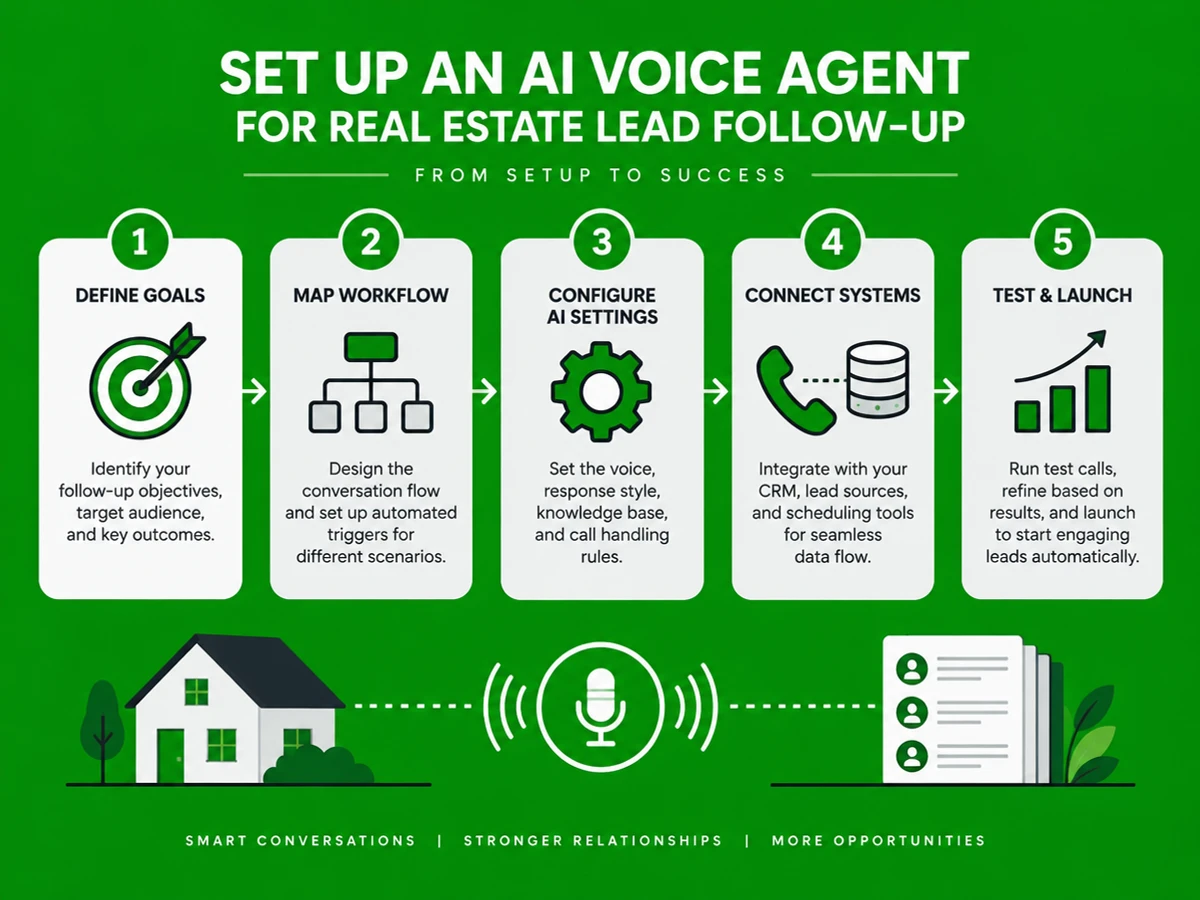
How to Set Up an AI Voice Agent for Real Estate Lead Follow-Up (2026 Step-by-Step Guide)
What You'll Learn
how to set up an AI voice agent for real estate lead follow-up | This guide walks you through how to set up an AI voice agent for real estate lead follow-up in 2026, from writing your call script to connecting the agent to your CRM and taking it live. Agencies, rental management firms, and home services businesses can use this sequence to make sure every inbound lead gets a call within seconds, not hours. You will learn which tools you need, how long each stage takes, and how to measure booked site visits.
Specifically, you will learn:
- How to map a lead follow-up workflow before touching any software.
- How to choose and configure a voice AI platform for real estate conversations.
- How to connect the agent to your CRM, listings, and lead sources without disrupting your team.
- How to test, launch, and optimize call outcomes using real conversion data.
Prerequisites: A working CRM or spreadsheet of leads, a phone number or SIP trunk for calling, and a list of the questions buyers or renters ask most often.
Why AI Voice Agent Setup Matters in 2026
Speed to lead is now the biggest lever in real estate conversion. Around 78% of homebuyers work with the first agent who responds. The average real estate agent takes 917 minutes (over 15 hours) to reply to a new inquiry, while agents who respond within 5 minutes are 21 times more likely to qualify a lead than those who wait 30 minutes. In India, average response time exceeds 4 hours, and 68% of real estate inquiries arrive after business hours, yet most teams only staff a 9-hour window.
That gap is expensive. 71% of internet leads are wasted due to poor follow-up, and real estate lead conversion rates average just 0.4% to 12%. One North India broker cut response time from 4+ hours to under 60 seconds, improved lead qualification 3x, and grew site visits from fewer than 5 to 12-15 per month on the same lead volume.
Persistence matters as much as speed. It takes 8 to 12 follow-up attempts on average to turn an internet lead into an appointment, and 80% of closed sales require five or more touches. Yet the average agent makes only 1.3 attempts before giving up. An AI voice agent provides instant first response and tireless, consistent follow-up without burning out your human team.
Key Takeaway: An AI voice agent gives real estate teams instant lead response and persistent follow-up, improving both qualification and site visit bookings. For supporting data, see AI voice agents for real estate: automation and ROI guide ....
The Process at a Glance
| Step | Action | Time | Outcome |
|---|---|---|---|
| 1 | Map your follow-up workflow and call script | 2-3 days | Clear qualification and escalation logic |
| 2 | Choose and configure the voice AI platform | 3-5 days | Agent speaks and handles property FAQs |
| 3 | Connect agent to CRM and lead sources | 2-4 days | Leads trigger calls automatically |
| 4 | Train, test, and set qualification rules | 3-5 days | Agent books and qualifies accurately |
| 5 | Launch, monitor, and optimize outcomes | Ongoing | Measurable lift in site visits booked |
Total time to first live call: roughly 2-3 weeks for a DIY build. Managed setups through a provider like Ezora usually go live in about two weeks.
Step 1: Map Your Follow-Up Workflow and Call Script
Every good voice agent starts with a clear conversation plan. Decide what the agent should ask, what it should say, and when it should hand off to a person.
What You're Doing
You are writing exactly what the agent will say, ask, and escalate on every call. This blueprint determines whether the agent sounds helpful or robotic.
How to Do It
- List every lead source, such as website forms, 99acres, MagicBricks, Zillow, Facebook ads, and walk-in rental inquiries.
- Write the 8-10 questions a human agent asks on a first call, covering budget, location, timeline, financing status, and property type.
- Define 3-4 call outcomes: booked site visit, qualified but not ready, not interested, or needs human handoff.
- Set your escalation rule, such as transferring to a live agent when a lead asks something outside the script or requests a human.
Best Practices
- Keep the opening line under 10 seconds. Leads hang up fast when the intro sounds like a script being read aloud.
- Confirm the caller's identity and property interest within the first 20 seconds, using a polite, natural question.
What Done Looks Like
You have a written call flow with branching logic that any platform or managed provider can configure directly. For a more detailed walkthrough, see University of Portland | Top-Ranked Catholic University in ....
Step 2: Choose and Configure the Voice AI Platform
Your call flow is only as good as the technology behind it. This step covers picking the platform that places and receives calls, then teaching it your listings and terminology.
What You're Doing
You are selecting the technology that makes and takes calls, then configuring it for real estate language and your inventory. This is essential for a natural, effective conversation.
How to Do It
- Decide between a DIY voice AI infrastructure tool and a done-for-you managed service. Voice AI infrastructure tools, such as Retell, Synthflow, and Bland, supply core voice capabilities and connect through webhooks and Zapier in 30-60 minutes. Your team must then build and maintain the conversation logic.
- If you go managed, a provider like Ezora builds and runs the agent for you. It responds to leads in under 60 seconds, works 24/7, and integrates with your existing systems so your team does not learn new software.
- Upload your property inventory, pricing ranges, and common objections so the agent answers specific questions instead of giving generic replies.
- Choose the voice, language, and tone. A Hindi-English mix works well for most Indian markets, while formal English suits NRI-focused listings.
Common Mistakes
Mistake: choosing a platform based only on cost per call, without testing response speed. High latency creates awkward silences that break the flow of a phone call. Strong systems keep their response pipeline under a second.
What Done Looks Like
A test call produces accurate answers to property questions, with natural timing and no awkward pauses.
Step 3: Connect the Agent to Your CRM and Lead Sources
A voice agent that waits for someone to press a button adds little value. The real benefit comes when it calls automatically as soon as a lead arrives and writes the result back to your records.
What You're Doing
You are wiring the agent into your lead flow so it triggers on every new inquiry and logs each interaction in your system of record.
How to Do It
- Connect your CRM, such as Follow Up Boss, kvCORE, or a spreadsheet pipeline, so new leads trigger an outbound call automatically.
- Set up webhook or native integrations from your portals (listing sites, Facebook Lead Ads, and website forms) into the voice agent.
- Configure call logging so transcripts, outcomes, and qualification tags sync back to the CRM.
- Test the full loop with a dummy lead, then confirm the agent calls within seconds and the result appears in your CRM.
Example
| Lead Source | Trigger | Agent Action | CRM Update |
|---|---|---|---|
| Website inquiry form | Form submitted | Calls within 60 seconds | Logs qualification score |
| Facebook Lead Ad | Lead ad completed | Calls and answers FAQs | Tags as "hot" or "nurture" |
| Missed inbound call | Call unanswered | Calls back automatically | Books site visit slot |
What Done Looks Like
Every new lead from any source triggers an outbound call, and the outcome appears in your CRM with no manual entry.
Step 4: Train, Test, and Set Qualification Logic
Testing reveals what the agent will do when a real caller goes off script. Skipping this step is the fastest way to have a voice agent that embarrasses your brand on day one.
What You're Doing
You are stress-testing the agent against realistic scenarios before any real lead hears it, so it handles edge cases gracefully instead of stumbling on the first unusual question.
How to Do It
- Run 15-20 test calls covering price negotiation, home loan questions, renters asking about pet policies, and angry or confused callers.
- Set qualification thresholds, such as budget range, timeline, and pre-approval status. The agent should tag each lead as hot, warm, or cold.
- Define the handoff trigger precisely. The agent should transfer to a human only when truly needed, not on every slightly complex question.
- Have a human agent review a sample of test recordings and flag anything unnatural or inaccurate.
Best Practices
- Track the KPIs that matter in your market. Industry benchmarks for well-configured agents put contact rate at 45-65% and appointment set rate at 40-60%.
- Test with real recorded calls, not just scripted scenarios. Callers rarely follow the script you expect, and that is where the useful lessons come from.
What Done Looks Like
The agent qualifies leads and escalates edge cases correctly in at least 90% of test calls, with no factually wrong answers about property details.
Step 5: Launch, Monitor, and Optimize Call Outcomes
Going live is the starting point for improvement. The teams that see the best results treat the first months as a learning period.
What You're Doing
You are rolling the agent out in phases and reviewing data regularly. Real gains come from reviewing call data every week and refining the script and qualification rules based on what actually happens on calls.
How to Do It
- Start with a subset of lead sources, such as website leads only, before adding every channel.
- Track contact rate, qualification rate, appointment set rate, and no-show rate weekly.
- Read a sample of call transcripts each week to spot recurring objections the agent handles poorly.
- Adjust script wording, FAQ answers, and escalation triggers based on the data.
Example
According to one 2026 platform comparison, brokerages using an AI-first qualification stack close roughly 3.4x more deals per lead than those relying on manual follow-up. The main driver is sub-90-second response times, and the gap tends to widen as the agent is tuned against real call data. This shows the value of continuous optimization.
What Done Looks Like
You have a repeatable weekly review routine and a measurable increase in booked site visits or qualified leads compared with your pre-AI baseline.
What to Do After Completing the Process
Once the agent is live, the work shifts from building to refining. Think of the next few months in three phases.
Phase 1 (Weeks 1-4): Stabilize. Monitor call quality daily, fix script gaps, and confirm CRM sync accuracy across every lead source.
Phase 2 (Months 2-3): Expand coverage. Add outbound re-engagement calls to cold or stale leads. Leads who receive six or more contact attempts convert at rates 70% higher than those who receive fewer touches. This is also the time to add rental, resale, or commercial inquiry flows if you started with one property type.
Phase 3 (Ongoing): Optimize for ROI. Compare your cost per booked appointment with your old human-only process, then shift your team's time toward site visits and closings instead of cold dialing. Platforms like Ezora report results through real-time dashboards, so this phase becomes a matter of reviewing numbers rather than auditing calls by hand. The question to keep asking is what the agent is doing for the business.
Resources You'll Need
| Resource | Role | Required/Recommended/Optional | Price |
|---|---|---|---|
| Ezora | Done-for-you AI voice agent platform for real estate, insurance, rentals, and home services | Recommended | Custom (quote-based) |
| Retell AI | Voice AI infrastructure for DIY builds | Optional (DIY route) | Usage-based |
| Follow Up Boss | CRM for lead tracking and agent assignment | Required | Paid subscription |
| Twilio | Telephony/SIP backbone for call routing | Recommended (DIY route) | Usage-based |
| Zapier | Connects lead sources to voice agent via webhook | Optional | Free tier available |
See also, see Best AI Tools for Real Estate Agents, Ranked for 2026.
Common Plateaus & How to Break Through
Even well-built agents hit rough patches. Most trace back to a handful of causes, each with a clear fix.
The agent books calls, but the visits don't convert to closings
Likely cause: qualification thresholds are too loose, so unqualified leads get booked as site visits.
Fix: tighten budget and timeline questions, and route borderline leads into a nurture sequence instead of an immediate booking.
Call volume went up, but contact rate stayed flat
Likely cause: calls go out when leads rarely pick up, or the caller ID doesn't look local.
Fix: spread attempts across morning, evening, and weekend windows. Evening and weekend leads convert 40% higher in real estate. Use a local number format wherever you can. Calls that arrive at the right time reach more leads.
Leads say the agent "sounds robotic"
Likely cause: high latency between the lead finishing a sentence and the agent responding.
Fix: move to a platform with sub-second latency and shorten scripted phrases so they sound conversational. Prioritize natural, human-sounding speech.
CRM data is inconsistent or duplicated
Likely cause: several lead sources feed the CRM without deduplication rules, or a webhook is misconfigured.
Fix: test each integration individually with a dummy lead and confirm deduplication is active before scaling to every source. Clean data is what makes your reporting trustworthy.
Key Takeaway: Most AI agent problems come down to loose qualification, poor call timing, high latency, and messy CRM data. Fix those, and results usually follow. For more troubleshooting advice, see AI Voice Agent for Real Estate: Top 7 Tools for 2026.
Conclusion
Setting up an AI voice agent for real estate lead follow-up in 2026 comes down to five steps: map your workflow, choose the right platform, connect it to your CRM and lead sources, test the qualification logic, and monitor and refine after launch. The payoff is faster response, more consistent follow-up, and higher booked-visit rates from lead volume you already pay for. If you would rather skip the build-and-maintain cycle, Ezora can build and run the agent for you. Ezora's view is that customer-facing businesses deserve automation that works quietly inside existing workflows, with a focus on integration, usefulness, and minimal disruption.
Key Takeaways
- A properly configured AI voice agent can cut lead response time from hours to under 60 seconds and meaningfully increase qualified appointments.
- The biggest gains come from pairing speed-to-lead with persistent, multi-touch follow-up. Speed alone is not enough.
- Your next step: map your current call script and lead sources this week, then decide between a DIY build and a managed service. Ezora handles the full setup, requires no staff retraining, and is typically live in about two weeks.
FAQ
How do you set up an AI voice agent for real estate lead follow-up in 2026?
Start by mapping your call script and qualification logic. Next, choose a voice AI platform, either a DIY infrastructure tool or a managed provider like Ezora. Connect the agent to your CRM and lead sources so calls trigger automatically. Finally, test against realistic scenarios, launch, and review contact rate, qualification rate, and appointment set rate weekly. DIY builds typically go live within 2-3 weeks, while managed setups usually take about two weeks.
How much does an AI voice agent for real estate cost in India?
Costs depend on the platform and call volume, but managed AI voice agents generally cost far less than a human telecaller team. One India-focused analysis found telecaller cost savings of ₹15,000-25,000 per person per month after switching to an AI voice workflow.
Do I need a developer to set up an AI voice agent?
Not necessarily. Infrastructure tools require technical configuration, but managed platforms are built so non-technical teams can launch without learning new software, since the provider configures and runs the agent.
How fast should an AI voice agent respond to a new lead?
As close to instant as possible. Leads contacted within five minutes are 21 times more likely to convert than those contacted after 30 minutes, and top-performing AI voice agents respond in under 60 seconds.
Can an AI voice agent replace a human real estate agent entirely?
No. It handles repetitive first response and qualification, then hands off to a human for site visits, negotiations, and closing, keeping your team focused on higher-value conversations.
What CRMs integrate with real estate AI voice agents?
Common integrations include Follow Up Boss and kvCORE. Teams using other systems can connect through custom webhooks, often via tools like Zapier, to keep data flowing smoothly.
How long does it take to see results after launching an AI voice agent?
Many teams notice a shift within the first few weeks. One documented case saw site visits rise from fewer than 5 per month to 12-15 site visits per month after implementation.
Is an AI voice agent only useful for inbound leads, or also outbound?
Both. It handles instant inbound response for new inquiries and can also run outbound re-engagement calls to stale or previously unconverted leads in your database.
Methodology: Statistics and benchmarks in this guide come from published 2025-2026 industry research, including MIT/InsideSales.com lead response studies, Inman's Real Estate Technology Survey, and vendor-published case data. Treat these figures as industry benchmarks rather than guarantees, since actual results vary by market, lead source quality, and execution.