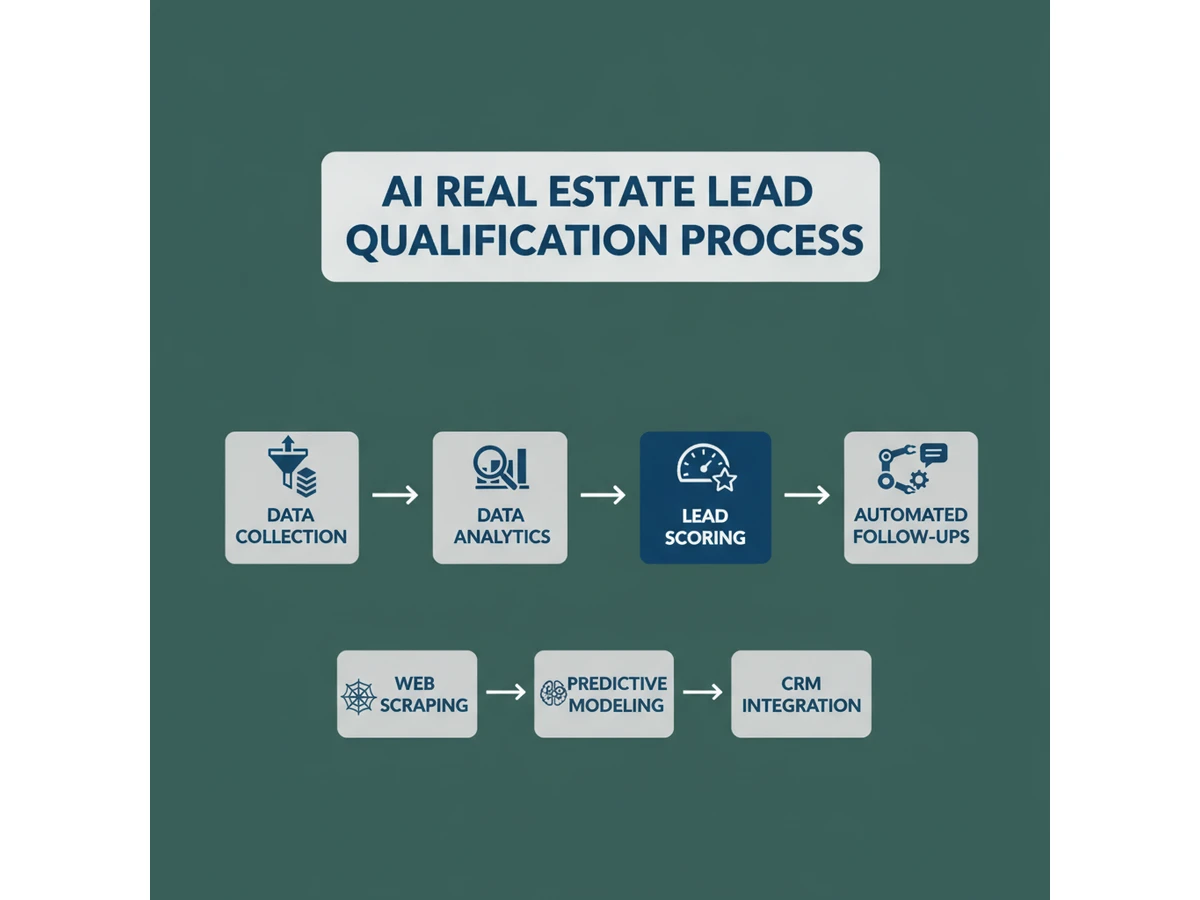
Your team might be drowning in new leads, yet your closers are still wasting hours calling people who will never buy, never sell, and never sign. Meanwhile, serious prospects slip through the cracks because no one reached them fast enough or with the right message.
As AI matures in 2026, agencies and home service businesses can now qualify real estate, insurance, and service leads automatically-scoring intent, routing them to the right agent, and personalizing outreach at scale. This article breaks down how modern data signals, scoring models, workflows, and Ezora-powered automation fit together, what it really takes to implement them, and why consistent tuning and human oversight are still required to see measurable lift in response rates, appointments, and revenue.
In a world where every click counts, automating lead qualification with AI isn't just a smart investment-it's the lifeline your real estate business needs to thrive amid an ever-evolving digital landscape. As we step into 2026, the question isn't whether you can afford to leverage AI, but can you afford not to?
Reference: Best AI Tools for Real Estate Agents (2026) - Agenttoolspro
1. Understanding AI Lead Qualification in Real Estate (2026 Landscape)
What AI lead qualification in real estate means in 2026
By 2026, AI-driven qualification acts as a 24/7 triage layer across real estate, insurance, and home services, screening every inquiry the moment it arrives. Systems parse web forms, chat transcripts, call recordings, and emails to assess intent, budget fit, and readiness to buy or sell.
For example, a Keller Williams team using a voice-enabled assistant can instantly flag a caller who mentions a relocation deadline in 60 days and a $750,000 budget as a priority, while routing casual “just browsing” renters into a nurture track instead of sales.
How AI fits into existing CRM and marketing automation stacks
Modern platforms connect directly into CRMs like Salesforce, HubSpot, and Follow Up Boss, updating lead scores, tags, and qualification fields in real time. Ezora can push “hot,” “nurture,” or “disqualified” labels directly into your pipeline the moment a conversation ends.
These systems also sync with marketing tools such as ActiveCampaign or Mailchimp to launch tailored email or SMS sequences based on qualification outcomes, improving relevance without replacing your existing stack.
Differences between AI qualification and rule-based filters
Static if–then rules might check only price range or ZIP code, missing nuance in how people communicate urgency. Machine learning models instead evaluate message content, response delays, and engagement history to predict close likelihood.
A brokerage analyzing two years of closed-won deals in BoomTown, for instance, can train models that learn patterns like “requests for second showings within 48 hours” or “mentions of expiring leases,” then continuously refine criteria without manual rule rewrites.
Why automated AI workflows matter for agencies, insurers, and SMBs
Automated screening reduces the hours teams spend manually sifting through low-intent inquiries and calling dead leads. A regional Allstate agency, for example, can have AI respond within seconds to quote requests, prioritize those with multi-policy potential, and alert producers immediately.
For smaller property management and HVAC companies running Google Ads, this automation lets them handle more inbound volume without adding coordinators, improving margins and turning ad spend into predictable, higher-quality pipelines.
2. Defining Your Ideal Client Profile Before You Automate
Mapping ideal buyer and renter profiles
Before Ezora can reliably score and route leads, you need a clear picture of who you actually want to work with in each segment. For a San Diego brokerage focusing on $700k–$1.1M properties, that might mean owner-occupiers with 10–20% down, investors targeting 6–8% gross yield, and renters earning 3x the monthly rent in stable W‑2 income.
Insurance teams can do something similar by mapping profiles by policy type, risk level, and coverage needs. Think of this like the CSS Profile, which collects detailed data so colleges can allocate aid accurately; you’re collecting structured client data so you can prioritize the right prospects. For property management, define ideal owners (e.g., 3–10 doors within 25 miles, willing to sign a 12‑month contract) and tenants (e.g., $80k+ income for a $2,200 unit, no evictions, pet policies aligned with your portfolio).
Identifying core qualification criteria
Once you know who you want, specify the minimum criteria a lead must meet. Budget should align with your typical transaction size or policy premium range; a Phoenix agency specializing in $400k–$650k homes, for example, can safely de-prioritize buyers capped at $250k because they rarely fit listed inventory.
Timeline and urgency matter just as much. A renter needing move‑in within 14 days or a homeowner whose policy renews in 30 days should trigger higher priority than someone casually exploring next year. Clarify intent by asking why they are buying, renting, or switching providers-clients motivated by a relocation or coverage gap are usually more committed than those “just browsing.”
Segmenting by service line
Your automation should never treat a $2,000/month rental inquiry the same way as a $2M commercial listing or a home warranty request. Create separate ideal profiles and rules for sales, rentals, property management, and home services, then adjust thresholds like average deal size, contract length, or minimum policy premium for each.
For example, a Boston agency might route condo buyers above $900k to a senior sales team while directing single‑family rental leads under $3,000/month to a leasing specialist. Connected but distinct workflows let you send each lead into the right pipeline stage, with different questions, SLAs, and follow‑up cadences tailored to that service line.
Aligning qualification with sales, operations, and compliance
Defining an ideal client in isolation leads to friction later. Sit down with sales leaders to agree on what “sales‑ready” means by geography and service-your Miami condo team may require verified proof of funds over $150k, while your insurance desk needs a completed risk questionnaire before quoting.
Operations and property management teams should validate that your criteria match real capacity, so you don’t accept 50 new short‑term rentals when cleaners and maintenance vendors are already stretched. In regulated lines like insurance, work with compliance or legal advisors to ensure your intake questions and data storage meet state rules and fair‑housing or anti‑discrimination standards, protecting both your brand and your automation stack.
3. Collecting and Structuring the Right Lead Data for AI
3. Collecting and Structuring the Right Lead Data for AI
Essential data points for AI lead qualification
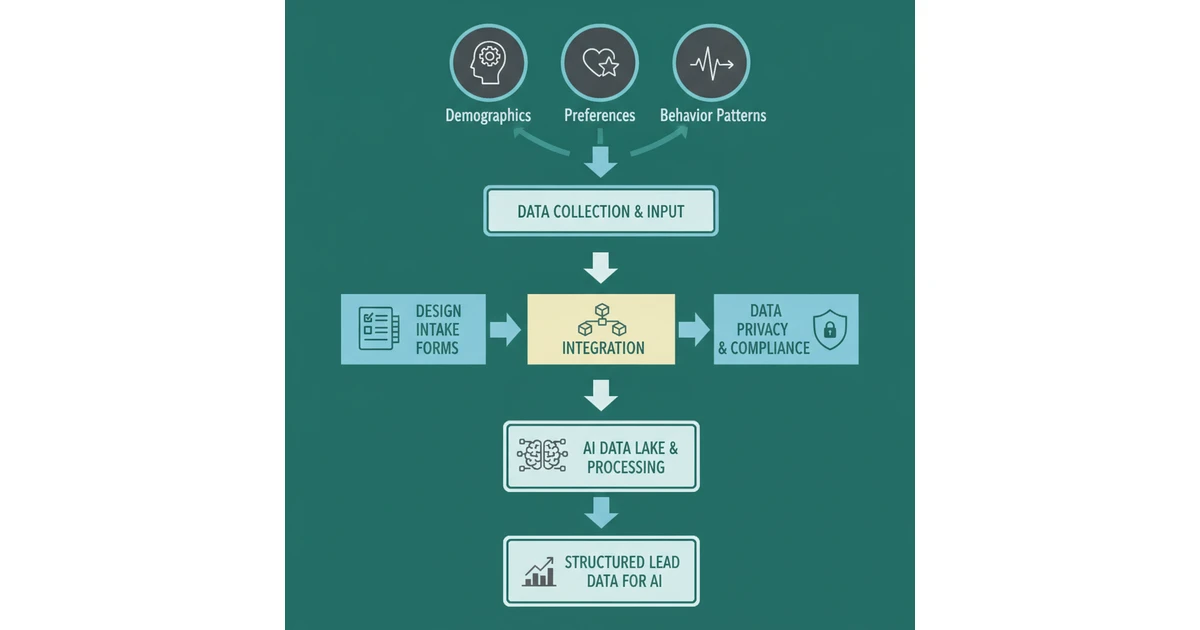
High-performing AI models depend on consistent, structured inputs. For real estate, insurance, and home services, that starts with the basics: contact details, property or service preferences, budget range, and geography. A brokerage using Ezora, for example, might capture a buyer’s email, phone, interest in a $450,000–$550,000 single-family home, and focus on Denver’s Capitol Hill and Highlands neighborhoods.
Deeper intent signals sharpen prioritization. Timeline to buy or switch providers, financing or policy status, income band, and current living situation (renting month-to-month vs. owning) help AI estimate deal probability. Logging the original source-Google Ads, Zillow, Meta lead ad-and every engagement across forms, calls, chats, and emails lets your system distinguish a cold Facebook click from a warm repeat caller, the way Compass or Keller Williams CRMs already segment their pipelines.
Designing intake forms and surveys for clean AI data
To feed AI accurate data, intake flows must be structured but lightweight. Use dropdowns, ranges, and yes/no toggles for critical qualification details instead of open text. A property management firm can ask for “Monthly rent budget” in $250 increments and “Desired move-in window” as 0–30, 31–60, or 60+ days, which dramatically reduces messy responses.
Keep first-touch forms short-name, contact, budget band, location, and timing-then let Ezora or tools like HubSpot send automated follow-up questions by SMS or email. Standardize wording across website forms, Facebook lead ads, and chatbot scripts so the model isn’t reconciling five versions of “When do you plan to move?” that all mean the same thing but parse differently.
Centralizing data via CRM integration
AI-driven qualification only works when all touchpoints roll into a single system of record. Connect your website, listing portals like Zillow or Apartments.com, and ad platforms such as Google Ads and Meta to a unified CRM that passes clean records into your AI layer. Many agencies do this by integrating tools like Salesforce, HubSpot, or Follow Up Boss with Ezora.
Every email, SMS, call note, and chatbot transcript should attach to one lead ID, not scattered profiles. Use unique tracking parameters (UTMs) and per-channel phone numbers from providers like CallRail so you can attribute deals back to specific campaigns and messages, then let the AI learn which combinations consistently generate closed policies, signed leases, or completed installs.
Handling data privacy, consent, and regulation in the US
Responsible AI lead qualification must align with US privacy, TCPA, and CAN-SPAM requirements. Capture explicit opt-in for SMS, email, and automated calling using unchecked boxes and clear language, and store a timestamped record in your CRM. Many Ezora clients pair this with double opt-in emails via services like Mailchimp or Klaviyo to reduce compliance risk.
Limit sensitive details to what is necessary-especially for insurance and financial data-and configure role-based access so only approved staff and AI workflows can see or process it. Audit logs should record when data is accessed or modified, which helps during internal reviews or if a state regulator, such as the California Attorney General under CCPA, requests evidence of compliant practices.
Reference: Build a lead list with AI - a Step-by-Step guide - Global
4. Building Automated AI Workflows to Qualify Leads 24/7
Mapping the End-to-End Automated Workflow
Reliable lead qualification starts with a clear, documented process. Map every stage from first contact through to a booked appointment so your AI workflows mirror how your top performers already work, instead of inventing a new process from scratch.
For a real estate brokerage, this might mean defining stages like: website visit, portal inquiry, AI screening, qualification, routing to agent, and follow-up. Triggers can include form submissions, missed calls, or Zillow/Realtor.com leads entering your CRM. Document exactly when humans step in-such as high-budget buyers or complex commercial cases-and define SLAs like "respond within 5 minutes" for hot leads.
Using AI Chatbots and Virtual Assistants for Pre-Qualification
AI assistants can replace static forms with conversational interviews that feel natural to prospects. Tools like Perspective AI, highlighted in Best AI Tools for Real Estate in 2026 by Agent Workflow, capture budget, timing, location, and motivation in a few questions.
A property management firm can deploy a chatbot on listing pages and WhatsApp to ask, “When are you planning to move?” or “Do you have pets?” The assistant uses natural language understanding to interpret open-ended responses, tags intent (buyer, renter, seller, insurer), and writes structured data into your CRM so your team sees clean profiles instead of raw transcripts.
Automating Follow-Ups and Nurture Sequences
Most leads are not ready to commit on day one, which is where automated nurture becomes critical. Set rules so AI-triggered SMS or email sequences fire when a prospect clicks a listing, requests a quote, or abandons a form halfway.
An insurance agency, for example, can send a detailed coverage comparison to high-intent auto prospects within 10 minutes, while long-timeline homebuyers receive monthly check-ins and market updates. Medium-intent leads get scheduled reminders every 7–10 days, keeping your brand present without overwhelming them or wasting agent time.
Routing and Prioritizing Leads with AI-Driven Criteria
Routing logic determines whether your best opportunities reach the right person fast. Train your system to score leads automatically and decide if they go to a senior agent, inside sales team, or a nurture track based on budget, location, product type, and engagement.
A multi-office brokerage can combine territory, language, and availability to assign Spanish-speaking Miami condo buyers to the right specialist within minutes. At the same time, high-intent signals-like requesting a same-day showing or a detailed insurance quote-trigger real-time alerts in Slack or Microsoft Teams so Ezora clients respond in minutes instead of hours.
Reference: Automating lead intake for AI agent development
5. Designing AI Lead Scoring Models That Reflect Real-World Intent
5. Designing AI Lead Scoring Models That Reflect Real-World Intent
Translate Business Rules Into AI Variables
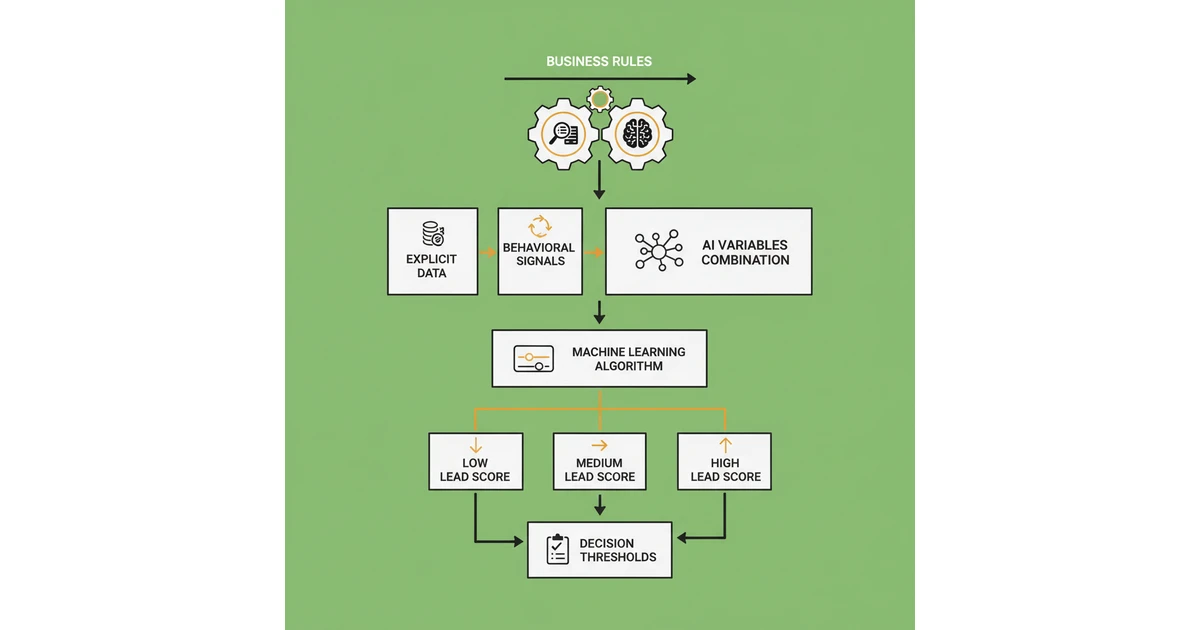
Before Ezora can prioritize leads, your human qualification rules must be expressed as data the model understands. That means turning criteria like “ready to buy in 90 days” or “owns at least one rental property” into structured fields and boolean flags.
A real estate brokerage using Follow Up Boss, for example, might convert price range, ZIP code, and pre-approval status into numeric attributes, then assign higher weights to pre-approved buyers within $25,000 of the target listing price. They can also encode hard disqualifiers such as inquiries outside their counties or budgets below $250,000.
Combine Explicit Data With Behavioral Signals
High-intent prospects rarely signal interest in just one way. Insurance providers using HubSpot often blend explicit profile data-household income, existing policy limits, or credit tier-with engagement metrics like quote-form completion, email reply time, and website session depth.
Ezora can also plug into call recordings from tools like Dialpad or Zoom Phone and use language models to detect urgency phrases such as “need coverage by Friday” or “lease ends next month.” Those conversational cues frequently predict conversion better than form fields alone.
Set Thresholds For Sales-Ready, Nurture, And Disqualify
Score bands keep your team from treating every contact the same. A rental management company might define 80+ as “sales-ready” (same-week move-in, meets minimum income, completed application), 40–79 as “nurture” (shopping but undecided), and below 40 as “disqualify or very low priority.”
To avoid overloading agents, align these thresholds with capacity. If your inside sales team can handle only 60 calls a day, Ezora should calibrate the cut-off so roughly that number of leads qualify as sales-ready on an average day, sending the rest into lighter email or SMS drips via Mailchimp or Klaviyo.
Improve Scoring With Closed-Won And Lost Data
The most accurate models are trained on reality, not assumptions. Feeding closed-won and lost data from your CRM-such as Salesforce or Zoho-back into Ezora lets the system see which factors truly predicted revenue, not just activity.
For instance, a home services business might discover that customers who booked a video estimate converted 35% more often than those who only requested a price by email. Ezora can then increase the weight for video estimate completion and reduce emphasis on weaker signals like generic newsletter opens.
Reference: AI Lead Scoring Guide: Definition, Benefits & Implementation
6. Personalizing Lead Qualification Across Channels with AI
Tailor questions and flows by channel
Different channels demand different qualification styles. Text-based channels like SMS, WhatsApp, and Facebook Messenger work best with very short, tappable questions that respect limited attention and screen size. Ezora can deploy 3–5 question flows that fit in a single screen, such as, “Are you looking to buy or rent?” followed by a one-tap reply.
On a brokerage site powered by Real Geeks or kvCORE, Ezora can run richer website chats and multi-step forms. A buyer inquiry from Zillow could trigger deeper questions on budget range, pre-approval status, and ideal move date, while a brief two-question SMS confirms urgency and viewing preferences.
Adapt questions based on prior responses and profile data
AI-led qualification becomes more effective when it reuses what you already know. If HubSpot or Salesforce already stores a contact’s location, Ezora skips that field and instead clarifies whether they’re an owner, renter, or investor. This reduces friction while keeping forms under one minute to complete.
When a State Farm lead selects “homeowner needing insurance,” Ezora branches into coverage limits and current carrier. If answers conflict-e.g., a renter claiming to own the property-the system asks a follow-up: “Do you currently live in the property you’re insuring, or is it a rental you own?”
Coordinate messaging across offerings
Many consumers need more than one service at the same time, especially in real estate and insurance. Ezora links profiles so if a buyer on a Keller Williams site also inquires about property management, the AI recognizes it’s the same person and avoids repeating basic questions like location and budget.
In practice, a landlord exploring tenant placement can be softly offered add-ons such as maintenance plans or landlord insurance: “Since you’re planning to lease this condo, would you like a quote for landlord insurance from Allstate as well?” The tone, brand voice, and value propositions remain aligned across every channel.
Ensure seamless human handoff with full context
Once a prospect is warm, handoff speed and context often decide who wins the business. Ezora pushes a structured summary into your CRM-lead score, timeline, price range, property type, and objections-so the assigned agent or advisor sees everything in one view.
For a renter qualified via Facebook Messenger, the leasing agent might receive a note: “Pre-qualified, budget $2,000, prefers pet-friendly units near downtown, wants to move within 30 days.” Agents can update outcomes after each call, feeding Ezora better data to refine future qualification flows and suggested follow-up scripts.
Reference: AI Agents for Lead Qualification: Automate, Prioritize, and ...
7. Implementing AI Lead Automation with Ezora (Step-by-Step)
7. Implementing AI Lead Automation with Ezora (Step-by-Step)
Choose the right tech stack with Ezora
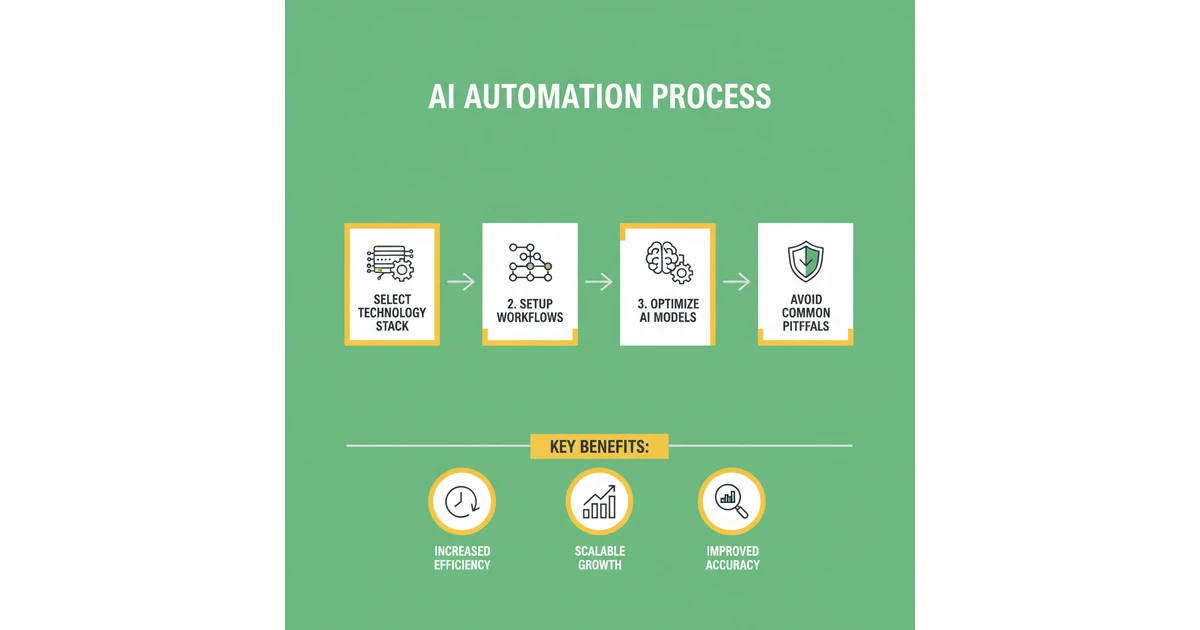
Before switching on any automation, confirm your core systems can exchange data cleanly with Ezora. For real estate brokerages using Salesforce or HubSpot CRM, verify that contacts, deals, and activities sync bi-directionally so lead status changes in one system are reflected in the other within minutes.
Standardize on a small set of communication channels Ezora can coordinate. For instance, an insurance agency might rely on Gmail for email, Twilio for SMS and voice, and Intercom chat on its website. Make sure your main lead sources-such as Zillow for property leads or Google Ads for home services-are connected so every inquiry lands in the same orchestration layer.
Set up Ezora for automated workflows
Once integrations are live, pull in at least 6–12 months of historical leads to help the system learn what a qualified opportunity looks like. A rental management firm, for example, can tag past approved tenants, no-shows, and unqualified applicants so Ezora can mirror those decisions going forward.
Define clear intake and follow-up flows: who gets contacted within the first 5 minutes, how many SMS and email touches occur in the first 72 hours, and when a lead is routed to a senior agent. Test with a small batch of live leads, watching for misrouted inquiries or duplicate outreach, then refine rules before rolling out to your full team.
Reference: How to Start an AI Lead Gen Agency in 2026 (Step By Step)
8. Measuring and Optimizing Your AI Lead Qualification System
Core KPIs for AI lead qualification
To improve an AI-driven qualification process, Ezora clients need a clear scorecard. Focusing on a few core metrics keeps your sales and marketing teams aligned on what “good” looks like across channels like Google Ads, Facebook, and Zillow.
Track qualified lead volume and the percentage of total leads per channel. For example, a Phoenix real estate brokerage using HubSpot found Facebook produced 40% of form fills, but only 18% met their AI criteria for budget and timeline, while Google Search delivered 30% of leads but 55% qualified.
Measure conversion from qualified lead to appointment, offer, policy, or signed contract. A regional auto insurer using Salesforce reported that AI-screened quotes converted to bound policies at 24%, versus 11% for manually screened leads, cutting cost per policy by almost 35%.
Track speed-to-lead, conversion, and ROAS
Response speed is where automation can dramatically impact revenue. For real estate, InsideSales.com (now XANT) found contact rates are up to 100x higher when leads are engaged within five minutes instead of an hour.
Measure average time from inquiry to first meaningful response, whether it is an Ezora chatbot qualifying a renter or a human agent calling back. Then review stage-to-stage conversion to see where good prospects drop, and connect ad spend to AI-qualified outcomes so you know which campaigns truly produce booked inspections, policies, or service jobs at profitable ROAS levels.
A/B test flows, scripts, and scoring thresholds
Structured experimentation helps you avoid guessing. In an HVAC home services firm using Intercom, a conversational flow that opened with a simple “Which day works best for your appointment?” beat a longer troubleshooting script by 17% in booked jobs.
Test different question orders, tones, and scoring weights for budget, location, and urgency. Keep each variant live until you hit a statistically valid sample size-at least several hundred leads for most SMBs-before rolling out the winner in your Ezora playbooks.
Use analytics to refine automated workflows
Dashboards from tools like Google Analytics, HubSpot, or Zoho should be reviewed weekly by sales and marketing leads. Look for patterns such as a sudden drop in qualified rental applications from one listing site or rising no-show rates for insurance consultations.
Use those insights to adjust prompts, routing, and follow-up cadences. For instance, a property management company might add a same-day SMS reminder after noticing 30% of tours from weekend leads were missed, then watch the no-show rate fall below 15% over the next month.
Reference: AI Driven Lead Qualification: Score And Prioritize Faster
Conclusion: Turning AI-Qualified Leads into Predictable Revenue
Business case for adopting AI lead qualification
When intake, screening, and routing are handled intelligently, more prospects receive fast, relevant responses instead of waiting days for a call back. Agencies using AI chat and forms, similar to how Zillow responds to buyer inquiries within minutes, consistently see higher appointment rates and fewer leads slipping through the cracks.
By automating the first layer of questions and disqualification, sales and advisory teams spend more time with serious buyers and policyholders. This reduces manual screening costs and makes revenue forecasting more reliable because the pipeline is filled with better-fit opportunities, not noise.
Key takeaways for successful AI qualification
Effective automation depends on clean data and a clear definition of your ideal client profile, whether that is a first-time homebuyer in Phoenix or a small contractor needing liability coverage. Well-designed handoffs-from AI to human advisors-ensure prospects never feel abandoned in a bot loop, which is a common failure when teams deploy chat without clear ownership.
Teams that review outcomes weekly, much like HubSpot users tracking lifecycle stages, can refine questions, scoring weights, and routing. This constant tuning keeps conversion rates healthy even as marketing channels, interest rates, and consumer expectations shift.
How Ezora supports agencies, insurers, and SMBs
Ezora brings intake, qualification, scoring, and routing into a single system so real estate, insurance, and home services teams can handle multiple service lines without juggling disconnected tools. A single homeowner inquiry can be triaged for both a listing consultation and a home warranty referral, using one unified workflow.
The platform connects with CRMs such as Salesforce and HubSpot, as well as communication tools like Slack, so staff can keep existing processes while gaining AI assistance. Built-in analytics and feedback options let supervisors review transcripts, adjust thresholds, and enforce guardrails, helping teams use automation responsibly and safely.
Next steps to get started and scale
The most effective rollouts start small, such as qualifying buyer leads from Facebook Ads in one metro area before expanding nationwide. Documenting your current scripts-questions about budget, timeline, coverage needs, or property type-gives you a blueprint to translate into AI rules and flows.
Plan a phased deployment with clear KPIs like response time, appointment set rate, and policy bind or closing rate. Provide short training sessions for agents and CSRs, and set governance around data use and escalation paths so you can scale automation without sacrificing compliance or customer trust.
FAQs About AI Lead Qualification and Real Estate Lead Automation
How does AI qualify real estate leads more accurately than manual methods?
AI-driven screening can examine hundreds of signals at once, from website behavior to email replies and CRM history. For example, a buyer who visits a three-bedroom listing on Zillow five times, opens every follow-up email, and uses phrases like “pre-approved with Wells Fargo” will be scored very differently from someone who clicks once and never returns.
Because the system evaluates patterns consistently, it avoids issues like agent fatigue at the end of the day or inconsistent phone notes. Models can learn from outcomes-such as which Zillow or Realtor.com leads actually close-so their predictions improve over time rather than staying frozen like a static script.
Why is 2026 the right time to invest in AI lead automation?
By 2026, most major CRMs such as Salesforce, HubSpot, and Follow Up Boss will have deep integrations with AI orchestration tools like Ezora, shrinking setup time. At the same time, consumer expectations for instant responses on channels like SMS and Meta Messenger keep rising, making delayed follow-up a real revenue leak.
Ad costs on Google and Meta have climbed steadily for real estate and insurance advertisers, so wasting budget on unqualified prospects is harder to justify. Agencies that automate qualification can protect margins and respond faster than competitors still relying on spreadsheets and manual callbacks.