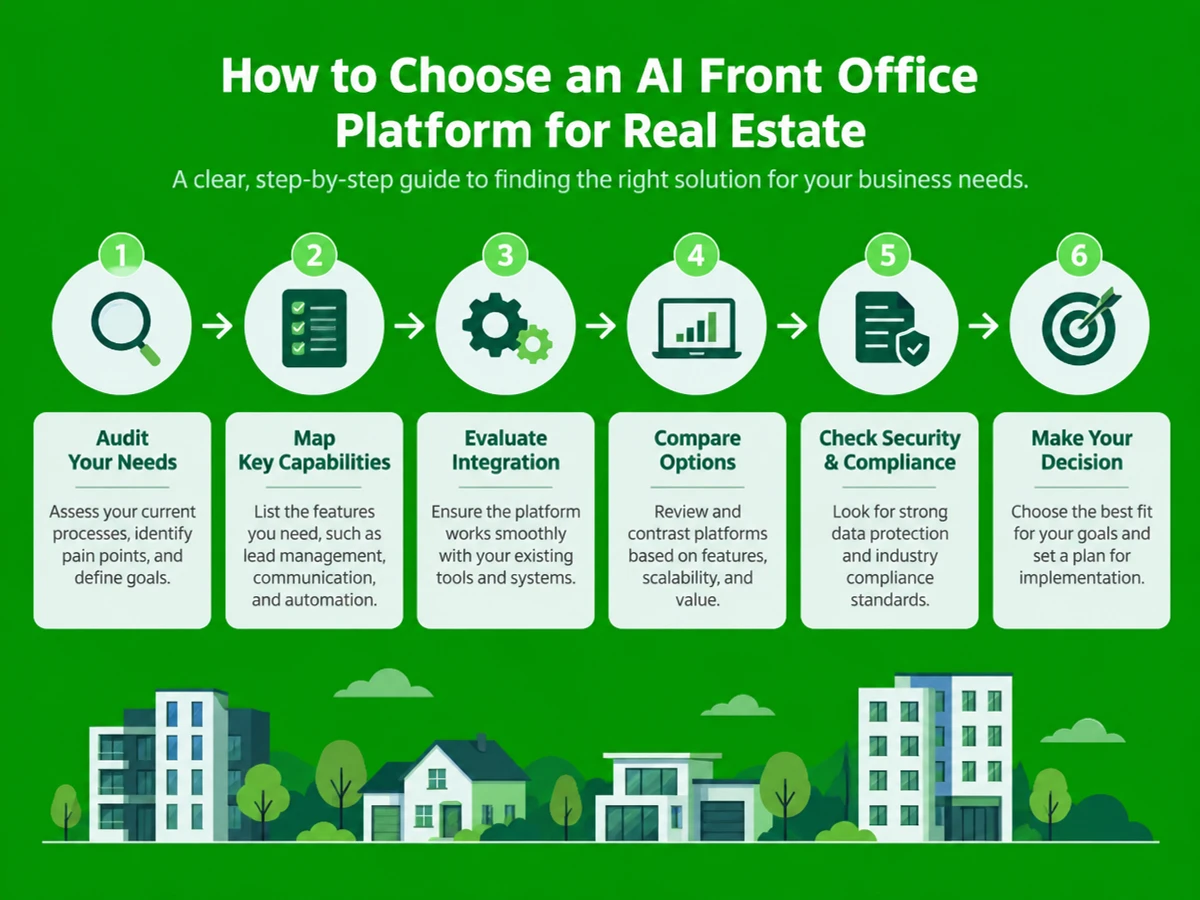
how to choose an AI front office platform for your real estate agency | Updated October 16, 2026 | Ezora Team | 2-3 weeks evaluation and pilot | Beginner
What You'll Learn
This guide walks you through how to choose an AI front office platform for your real estate agency in 2026. You'll follow a five-step evaluation process covering capability mapping, CRM integration, vendor comparison, and pilot testing before you sign anything. The same criteria apply whether you run a residential brokerage, a rental company, or a home services business that depends on fast lead response.
- A clear way to identify where your agency's front office is leaking leads.
- The five core capabilities every AI front office platform should offer in 2026.
- A method for judging CRM integration depth, so the platform works with your existing stack.
- A pilot-testing approach that validates ROI before you commit to a full rollout.
Prerequisites: basic familiarity with your agency's current CRM, call volume, and lead sources. No technical or coding background is required.
Why Choosing the Right AI Front Office Platform Matters in 2026
Speed to lead is the single biggest lever in real estate conversion, and most agencies are losing that race. Inman's Real Estate Technology Survey found that the median agent response time to a new web inquiry is 917 minutes, or more than 15 hours after first contact. Meanwhile, 78% of buyers work with the first agent who responds.
Research from MIT and InsideSales.com, which analyzed more than 1.25 million sales leads, found that responding within 5 minutes makes an agent 100x more likely to connect and 21x more likely to qualify the lead than waiting 30 minutes. Additionally, 30 to 40% of leads arrive outside standard business hours, and real estate carries a 9% missed call rate across inbound leads, according to CallRail's benchmark analysis.
Adoption is already high. According to RPR's February 2026 survey of NAR members, 82% of real estate agents now use AI tools in their business, up from roughly 15% in 2023. The share of brokerages with no plans to adopt AI has dropped to just 1.9%. Yet only 17% of agents report a significant positive business impact from AI. The real problem is choosing a platform that actually fixes speed-to-lead, rather than one that just produces marketing copy.
Key Takeaway: Rapid lead response drives real estate conversion, and slow responses cost commission directly. Success depends on choosing a platform built to solve speed-to-lead. For supporting data, see Best AI Tools for Commercial Real Estate in 2026, Ranked.
The Process at a Glance
| Step | Action | Time | Outcome |
|---|---|---|---|
| 1 | Audit current front office gaps and missed leads | 2-3 days | Baseline metrics on calls, response time, coverage |
| 2 | Map required capabilities against vendor shortlist | 3-5 days | Scored comparison of 3-5 platforms |
| 3 | Evaluate CRM and tech stack integration depth | 2-3 days | Confirmed compatibility with existing systems |
| 4 | Compare implementation speed, support, and reporting | 2-4 days | Shortlist narrowed to top 1-2 vendors |
| 5 | Run a paid pilot and measure against baseline | 2 weeks | Data-backed go/no-go decision |
Total time: approximately 2-3 weeks from your first audit to a confident platform decision.
Step 1: Audit Your Current Front Office Gaps
What You're Doing
Before you look at a single vendor, you need to know exactly where your agency is losing leads. Calls, web forms, WhatsApp messages, and after-hours inquiries all count. Skipping this step leads to buying features you don't need while missing the gap that costs the most.
How to Do It
- Pull the last 90 days of CRM data and calculate the median time from lead creation to first human contact attempt.
- Check your call logs for the missed-call percentage and the share of calls that come in after hours or on weekends.
- Tag leads by source (portal, website, referral, walk-in) and note which sources get the slowest response.
- Ask your team whether leads sit in a shared inbox or whether one person is accountable for each follow-up.
Best Practices
- Track the median, not the average. A single abandoned lead can skew the overall picture.
- Separate automated acknowledgements (auto-replies, chatbots) from genuine human first contact when measuring response time.
Common Mistakes
Many agencies assume their response time is "good enough" based on gut feeling rather than CRM timestamps. The audit often reveals a number much closer to the industry's 15-hour average. Almost every team is surprised by its own numbers, so go in ready for uncomfortable results.
What Done Looks Like
You have a one-page summary showing median response time, missed-call rate, and after-hours lead volume. You'll use these numbers to measure ROI later. For a more detailed walkthrough, see Office of the Spokesman.
Example
| Metric | Typical Agency Baseline | Target After AI Front Office |
|---|---|---|
| Median response time | 4-15 hours | Under 5 minutes |
| Missed call rate | 9% or higher | Near 0% |
| After-hours lead coverage | None or voicemail only | Live AI answer, 24/7 |
Step 2: Map the Capabilities an AI Front Office Platform Needs in 2026
What You're Doing
Your audit shows where the leaks are. This step turns those findings into a scored checklist of must-have capabilities. It keeps you comparing vendors against your actual needs instead of a generic feature list.
How to Do It
- List the channels your leads actually use: phone calls, SMS, WhatsApp, website chat, and portal messages.
- Decide whether you want done-for-you setup, where the vendor builds and manages the AI agent, or a DIY builder your own team configures.
- Require after-hours and weekend coverage. Leads that receive a same-night response have an 85% contact rate, compared with 35% for leads contacted the next morning.
- If your market includes Hindi, Marathi, Tamil, or other regional-language buyers, confirm multilingual voice and messaging support, not just English scripts.
- Score each platform from 1 to 5 across five capabilities: voice coverage, messaging coverage, setup model, CRM integration, and reporting depth.
Best Practices
- Weight after-hours coverage and lead follow-up most heavily, since these two gaps account for much of the 15-hour industry response lag.
- Ask for a live demo call to the platform's own AI agent before you trust a sales deck.
What Done Looks Like
You have a scored matrix of 3-5 vendors against your five core capabilities. No platform should score below a 3 on the channels your agency actually uses.
Step 3: Evaluate CRM and Tech Stack Integration Depth
What You're Doing
A great AI agent that can't talk to your CRM just creates a second system to babysit. This step confirms that the platform can integrate seamlessly with your existing CRM and tech stack, avoiding manual data reconciliation. If the platform can't write leads, call outcomes, and follow-up notes directly into your CRM, your team ends up doing the work the software was supposed to handle.
How to Do It
- List every system the platform must connect to: your CRM, your calendar for bookings, and any portal lead feeds from property listing sites.
- Ask each vendor whether the integration is native, runs through a third-party connector such as Zapier, or requires custom development.
- Confirm that lead status, call transcripts, and tags sync back to your CRM in real time, not in a delayed batch.
- Check whether your team needs new software or retraining, or whether the AI layer works quietly inside the tools they already use.
Best Practices
- Favor platforms designed around integration and usefulness, not ones that ask your team to learn yet another dashboard. Ezora takes the view that customer-facing businesses deserve intelligent automation that fits into existing workflows, with a focus on integration and usefulness that minimize disruption and maximize immediate business impact.
- Test with a small batch of real leads before committing to a full data migration.
Common Mistakes
Teams often sign based on a polished feature demo, then learn that CRM integration requires a paid add-on or a multi-week developer project. Ask about integration costs before you get excited about features.
What Done Looks Like
Leads, call outcomes, and AI-generated summaries appear automatically in your existing CRM record, with no manual data entry from your agents.
Key Takeaway: Deep, real-time integration with your CRM and calendar is non-negotiable. Prioritize platforms that work quietly inside your current tools.
Step 4: Compare Vendors on Implementation Speed, Support, and Reporting
What You're Doing
Once capabilities and integration check out, the decision shifts to operations. This step compares vendors on implementation speed, quality of support, and the depth of their reporting. Ask how quickly you can go live, what happens when something breaks, and whether the reports show more than raw call counts.
How to Do It
- Ask each vendor for a concrete go-live timeline in writing, not a vague "a few weeks."
- Confirm whether support means a dedicated account contact or a generic ticket queue, and ask about the response SLA.
- Request a sample report. Does it show calls answered, leads followed up, booking rate, and missed-lead recovery?
- Check the pricing structure (per seat, per call, or flat platform fee) and model it against your current lead volume.
Best Practices
- Choose a platform built for your industry vertical, not a generic chatbot tool retrofitted for real estate.
- Prioritize vendors who commit to a specific implementation window. Ezora helps businesses never miss a call or lead with fast, fully integrated AI voice and messaging agents. The solutions are designed to be easy to implement, require no staff retraining, and deliver actionable reporting to drive growth, typically going live in about two weeks.
Example
| Evaluation Criterion | Vendor A (Generic Chatbot Tool) | Industry-Built AI Front Office |
|---|---|---|
| Go-live time | 6-8 weeks + dev work | ~2 weeks, no new software for staff |
| Support model | Email ticket queue | Dedicated onboarding and account support |
| Reporting | Raw chat logs | Real-time call/lead reports tailored to the business |
What Done Looks Like
You have a shortlist of one or two vendors, each with a written go-live date, a support SLA, and a sample report you've reviewed yourself.
Step 5: Run a Pilot and Measure Against Your Baseline
What You're Doing
This is where the decision gets real. A short, measured pilot shows how the platform performs on response time, booking rate, and lead recovery using your own leads. No vendor demo can substitute for that data.
How to Do It
- Run the pilot for at least two weeks so you capture both weekday and weekend lead patterns.
- Track the same three metrics from your Step 1 audit: median response time, missed-call rate, and after-hours coverage.
- Compare pilot results directly against your own baseline, not industry averages.
- Interview your team about whether the AI agent's handoffs and reporting fit naturally into their daily workflow.
Best Practices
- Set a clear go/no-go threshold before the pilot begins, for example "response time under 5 minutes on 95% of leads."
- Include at least one after-hours or weekend stretch in the pilot window, where the biggest gaps usually show up.
What Done Looks Like
You have side-by-side pilot data showing measurable gains in response time and lead follow-up over your pre-pilot baseline, giving you a defensible basis for the rollout decision.
What to Do After Choosing Your AI Front Office Platform
Signing the contract is the starting line, not the finish. Phase 1: Full rollout (Weeks 1-4). Migrate all lead sources into the new platform, confirm CRM sync is live, and set escalation rules for when the AI should hand off to a human agent.
Phase 2: Optimization (Months 2-3). Review reporting weekly and refine scripts, follow-up cadences, and after-hours routing based on real conversion data.
Phase 3: Scale and expand (Month 4 onward). Once the core lead-response workflow is proven and stable, extend the platform to additional use cases such as renewal outreach, rental inquiries, or insurance cross-sell.
Resources You'll Need
| Resource | Role | Status | Price |
|---|---|---|---|
| Ezora | AI front office platform: voice and messaging agents that answer calls, follow up leads, and generate reporting | Recommended | Custom, contact for pricing |
| NAR Technology Survey | Industry benchmark data for response time and AI adoption | Recommended | Free |
| Follow Up Boss (or your existing CRM) | Lead management backbone the AI platform integrates with | Required | Paid, varies by seats |
| CallRail | Call tracking to establish your missed-call and response-time baseline | Optional | Paid |
| Zapier | Connector for integrations not natively supported by your chosen platform | Optional | Free tier available, paid plans scale up |
See also, see The Best AI Tools for Real Estate Agents in 2026.
Common Plateaus & How to Break Through
Problem: The AI platform answers calls, but leads still aren't converting faster
Likely cause: The AI is acknowledging leads without qualifying them or booking appointments, so it behaves like an expensive voicemail.
Fix: During the pilot, require vendors to demonstrate end-to-end booking or hand-off, not just message acknowledgement.
Problem: Your team is ignoring the AI-generated reports
Likely cause: The dashboard requires a separate login the team never adopted, so the insights go unused.
Fix: Choose a platform that delivers reports inside tools your team already checks daily, such as your CRM or existing messaging channel.
Problem: Implementation is taking far longer than promised
Likely cause: Integration with your CRM or phone system wasn't fully scoped before the contract was signed.
Fix: Get a written implementation timeline with milestones before signing, and confirm integration complexity during Step 3.
Problem: Multilingual or regional-language leads are falling through
Likely cause: The voice and messaging agents were configured for English only, missing a large share of India's buyer and renter base.
Fix: Confirm support for your specific regional languages during vendor demos. Don't accept a general "multilingual capable" claim on the sales page. For more troubleshooting advice, see NOAA's National Weather Service - Glossary.
Conclusion
Choosing the right AI front office platform for your real estate agency in 2026 comes down to a disciplined process. Audit your gaps, map the capabilities you need, verify integration depth, compare vendors on speed and support, and validate everything with a real pilot. Skip any of these steps and you risk AI tools that generate plenty of activity but few conversions.
Key Takeaways
- Build every platform decision on a measurable baseline: median response time, missed-call rate, and after-hours coverage.
- The platforms that move the needle fit invisibly into your existing CRM and workflow, rather than asking your team to learn new software.
- Your next action: run the Step 1 audit this week, before you contact any vendor, so every pilot result can be measured against real numbers.
FAQ
How do I choose an AI front office platform for real estate in 2026?
Start by auditing your agency's current lead response performance, including median response time, missed-call rate, and after-hours coverage. Map those gaps against five core capabilities: voice and messaging coverage, setup model, CRM integration depth, after-hours support, and multilingual capability. Score a shortlist of 3-5 vendors, then validate your top choice with a two-week pilot measured against your original baseline.
What is an AI front office platform in real estate?
An AI front office platform handles customer-facing interactions across phone calls, SMS, WhatsApp, and web chat. AI agents answer inquiries, qualify leads, book appointments, and log everything back into your CRM, acting as a 24/7 extension of your agency's front desk.
How much does an AI front office platform cost for a real estate agency?
Pricing varies widely by vendor and typically depends on call volume, the number of channels, and whether setup is done-for-you or self-managed. Model per-seat, per-call, or flat monthly pricing against your current lead volume before comparing vendors.
How long does it take to implement an AI front office platform?
Platforms built specifically for real estate workflows can often go live in about two weeks, with no new software for staff to learn. Generic chatbot tools retrofitted for real estate frequently take six to eight weeks or longer because of custom integration work.
Do I need CRM integration for an AI front office platform to work?
Yes. Without direct CRM integration, your team must reconcile lead data between two systems by hand, which cancels out much of the time savings. Confirm real-time, native integration before signing any contract.
What's the difference between done-for-you and DIY AI front office setup?
With done-for-you platforms, the vendor builds, configures, and manages the AI agent's scripts and workflows. DIY platforms give your team a builder interface to configure everything in-house. Done-for-you setups generally launch faster and need less internal technical capacity.
Why does after-hours lead coverage matter so much for real estate agencies?
A large share of real estate leads arrive outside standard business hours, and leads that get a same-night response are far more likely to make contact than those reached the next morning. That makes 24/7 coverage one of the highest-return capabilities an AI front office platform can offer.
Can an AI front office platform support multiple languages for Indian real estate markets?
Most modern platforms support multilingual voice and messaging, but capability varies significantly by vendor. If you serve Hindi, Marathi, Tamil, or other regional-language buyers, confirm specific language support during a live demo rather than relying on general marketing claims.
Methodology: This guide synthesizes publicly available industry research on real estate lead response times and AI adoption, including surveys from Inman, the National Association of Realtors (NAR), Realtors Property Resource (RPR), Delta Media Group, and CallRail, alongside standard real estate technology evaluation frameworks. Figures cited reflect the most recent published data available as of October 2026 and should be validated against your own agency's data during the audit step.