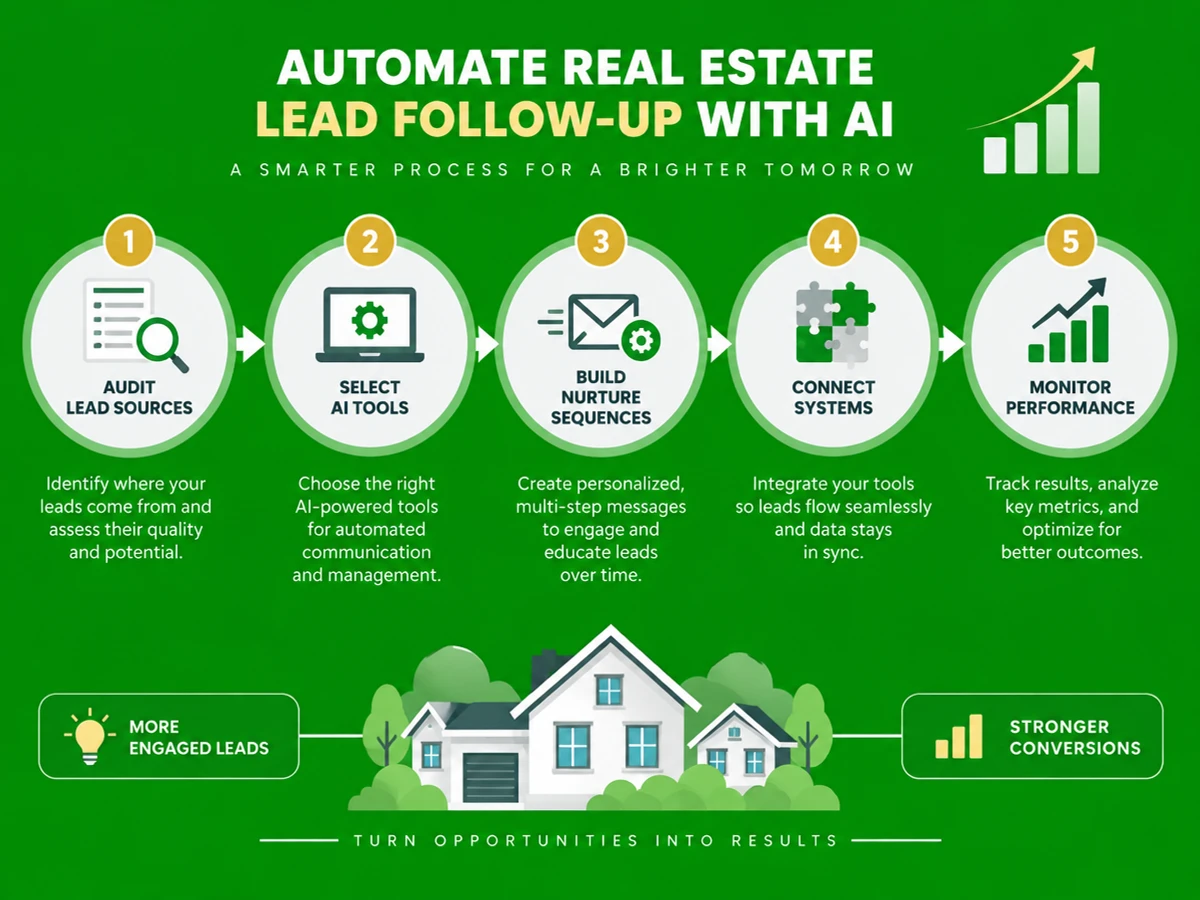
What You'll Learn
how to automate real estate lead follow-up with AI | This guide walks you through how to automate real estate lead follow-up with AI, step by step. You'll set up AI voice and messaging agents that respond to every inquiry within minutes and qualify leads around the clock. The result: no lead from a portal, website form, or WhatsApp message goes cold, and replies arrive in under a minute instead of the 15-hour industry average.
- How to map every lead source so nothing slips through manual intake.
- How to choose between chatbot, SMS, and AI voice follow-up based on your lead volume.
- How to script a compliant, natural-sounding AI nurture sequence.
- How to connect AI follow-up to your CRM and measure what actually converts.
Prerequisites: an active lead source (property portal, website form, or ad campaign), a CRM or spreadsheet where leads currently land, and admin access to connect a third-party tool.
Why Automating Lead Follow-Up Matters in 2026
Speed to lead is the most controllable factor in real estate conversion, and most agencies are losing on it. According to Inman's Real Estate Technology Survey, the median agent response time to a new web inquiry is 917 minutes, or over 15 hours. A study from MIT and InsideSales.com, which analyzed more than 1.25 million sales leads, found that responding within 5 minutes made agents 100x more likely to connect with a lead and 21x more likely to qualify it than waiting 30 minutes. The finding is widely cited in recent lead response research.
The cost of delay adds up quickly. 78% of buyers work with the first agent who responds, and 63% of leads get no response at all within 24 hours. Persistence doesn't close the gap either. Leads typically need 8 to 12 touchpoints before they convert, yet 44% of agents quit after one attempt and only 10% make more than three, according to Follow Up Boss data cited in industry analysis.
Real estate also leads all industries in chatbot adoption at 28%, per recent technology adoption research. No human team can consistently hit a 5-minute window at scale. AI follow-up has moved from "nice to have" to a baseline requirement for real estate agencies, rental managers, insurance providers, and home services businesses.
Key Takeaway: Automating lead follow-up with AI closes the gap between how fast you should respond and how fast you actually do. For supporting data, see Follow USA: Impact Vests, Life Jackets, Wetsuits and Apparel.
The Process at a Glance
| Step | Action | Time | Outcome |
|---|---|---|---|
| 1 | Audit lead sources and define triggers | 1-2 days | Clear map of every inbound lead channel |
| 2 | Choose an AI follow-up tool | 2-4 days | Platform matched to volume and channel mix |
| 3 | Build the AI nurture sequence | 3-5 days | Scripted voice/SMS flow ready to deploy |
| 4 | Connect AI to your CRM and test | 2-3 days | Live system routing and logging every lead |
| 5 | Monitor, refine, and scale with reporting | Ongoing, weekly review | Continuous improvement in response and conversion rate |
Total time to full deployment: about 2-3 weeks from audit to a live, monitored AI follow-up system.
Step 1: Audit Your Lead Sources and Define Follow-Up Triggers
What You're Doing
Every automation project starts with a question: where do leads actually come from? Most agents can name their main portal, but few can list every channel that feeds them. A surprising number of leads arrive through a side door, like a forgotten contact form or a WhatsApp number on a yard sign. This step gives the AI a complete map.
How to Do It
- List every lead channel: property portals, Google and Meta ads, your website, WhatsApp Business, and inbound calls.
- For each channel, note the current average response time and who, if anyone, owns follow-up.
- Identify leads that go unanswered after hours or on weekends, when agents are least available.
- Define one trigger rule, such as "every new portal lead gets first contact within 60 seconds," so the AI and your team work from the same playbook.
Best Practices
- Look at median and worst-case response times together. Averages hide the leads nobody touched at all.
- In India-focused operations, treat WhatsApp and SMS as primary channels, not afterthoughts.
What Done Looks Like
You have a one-page document listing every lead source, its current response gap, and the trigger rule the AI will follow for each. That document is the foundation for how to automate real estate lead follow-up with AI across all channels. For a more detailed walkthrough, see How to Automate Lead Follow Up Real Estate.
Step 2: Choose an AI Follow-Up Tool for Real Estate Lead Nurturing
What You're Doing
Your tool choice decides whether this project takes three weeks or three months. The right platform fits the way you already work. Here you select the AI automation platform for real estate that will call, text, or chat with your leads, matched to your volume, team size, and existing stack.
How to Do It
- Decide whether you need AI voice (automated callbacks), AI messaging (automated SMS or WhatsApp conversations), or both.
- Shortlist platforms built for customer-facing AI agents rather than generic chatbots. Real estate leads expect a real conversation, not a scripted bot.
- Check whether the tool requires your team to learn new software, or whether it runs on top of your CRM and phone lines. Ezora, for example, is a done-for-you AI front office that answers every call and follows up on every lead without retraining your staff.
- Confirm the platform supports your languages and local calling numbers, especially across several Indian cities or international markets.
Common Mistakes
Mistake 1: Choosing a tool only because it's cheap, then finding it can't place outbound AI voice calls. Mistake 2: Picking a self-serve builder that takes weeks of internal setup when you need a working system in days.
What Done Looks Like
You've signed up for, or booked a demo of, one AI follow-up platform that covers your main lead channels without a new system for your team to learn.
Step 3: Build the AI Nurture Sequence and Scripts
What You're Doing
This is where the system starts to sound like your business. A strong first call makes a lead feel looked after, while a vague one sounds like every robocall they've ignored. Design the full conversation flow, including the first call, follow-up texts, and qualifying questions.
How to Do It
- Draft an opening script that confirms the lead's interest, property or budget, and timeline in the first exchange.
- Build a multi-touch cadence of at least 6-8 touches across call, SMS, and email. Leads typically need 8 to 12 touchpoints to convert, so plan for the long game.
- Add branching logic for common objections such as "just browsing," "already working with another agent," or "wrong budget range."
- Set escalation rules so qualified, hot leads go to a human agent instantly, with the full conversation attached.
Example
| Touch | Channel | Timing | Purpose |
|---|---|---|---|
| 1 | AI voice call | Within 60 seconds of enquiry | Confirm interest, capture budget/timeline |
| 2 | SMS/WhatsApp | 5 minutes after call | Send matching listings or confirm visit |
| 3 | AI voice call | Day 2 | Follow up if no response |
| 4-8 | Mixed SMS/call | Days 4, 7, 14, 21, 30 | Nurture until qualified or disqualified |
What Done Looks Like
You have a documented, branch-aware script that reads naturally on a live call and routes every outcome (interested, not interested, needs a human) to the right next action.
Step 4: Connect the AI System to Your CRM and Test Live
What You're Doing
An AI that talks well but logs nothing creates more work, not less. This step connects your follow-up tool to your CRM (Customer Relationship Management system) or lead spreadsheet, so every call, text, and outcome is recorded automatically. The goal is zero manual data entry.
How to Do It
- Connect your portal and website forms so new leads push straight into the AI system, not an inbox that sits unread.
- Map AI call outcomes (qualified, callback requested, not interested) to the correct CRM fields or pipeline stages.
- Run a controlled test. Submit a dummy lead through each channel, then time how fast the AI responds and how accurately it logs the result.
- Set real-time alerts so your team knows the moment the AI flags a hot lead.
Best Practices
- Test on evenings and weekends specifically, since that's when manual follow-up gaps are widest.
- Keep a human in the loop for complex negotiations. AI should qualify and nurture, not make judgment calls on price.
What Done Looks Like
A test lead submitted at any hour gets an AI response in under a minute, and the outcome appears correctly in your CRM with no manual cleanup.
Step 5: Monitor Performance and Scale With Reporting
What You're Doing
Automation without measurement is just a hopeful guess. Watch response time, qualification rate, and conversion rate every week. The data shows which scripts to refine, which touchpoints to cut, and how to demonstrate return on investment (ROI) to stakeholders.
How to Do It
- Review a weekly report covering average first-response time, total leads handled, and leads escalated to humans.
- Compare qualification rates against your baseline. Top-performing agents using fast automated response and structured multi-touch nurture push portal lead conversion to 5%-9%, with referral lead conversion well above 25%.
- Find scripts or touchpoints with low engagement and revise the wording or timing.
- Once the real estate workflow is stable, extend the system to insurance renewals, rental enquiries, or service bookings.
What Done Looks Like
You receive a recurring report showing response time staying under 5 minutes and a measurable lift in qualified leads over your pre-automation baseline.
What to Do After Automating Lead Follow-Up
Phase 1 (Weeks 1-4): Stabilize. Confirm every lead source feeds the AI system correctly, and that response time stays under 5 minutes consistently, not just on good days.
Phase 2 (Months 2-3): Optimize. Use weekly reports to A/B test scripts, adjust the touch cadence, and decide which leads go to a human and which the AI can nurture fully on its own.
Phase 3 (Month 3 onward): Expand. Extend the same infrastructure to rental renewals, insurance policy follow-ups, or after-hours service calls.
Resources You'll Need
| Resource | Role | Requirement | Price |
|---|---|---|---|
| Ezora | Done-for-you AI voice and messaging agent for calls, follow-up, and reporting | Required (core platform) | Custom, by business size |
| Follow Up Boss | CRM to store and route lead data | Recommended | Paid plans |
| WhatsApp Business API | Messaging channel for India-focused lead nurture | Recommended | Free tier + usage fees |
| Zillow Premier Agent or local portals (99acres, MagicBricks) | Primary lead generation source | Required (lead source) | Paid subscription |
| NAR research and reports | Benchmarking response-time and conversion standards | Optional | Free |
Common Plateaus and How to Break Through
Plateau 1: AI responds fast but conversion doesn't improve
Likely cause: The script confirms interest but never asks the qualifying questions (budget, timeline, location) a human agent needs to close.
Fix: Rebuild the first-touch script around 2-3 qualifying questions before sharing listing details, and send only genuinely qualified leads to your sales team.
Plateau 2: Leads say the AI sounds robotic or repetitive
Likely cause: One rigid script is reused for every lead type and channel.
Fix: Add branching logic tied to lead source and stated intent. Review transcripts weekly and retire any phrasing that sounds canned.
Plateau 3: CRM data is incomplete or duplicated
Likely cause: The AI tool and CRM were connected without mapping every outcome field, so some call results never sync.
Fix: Audit the integration monthly. Confirm every possible AI outcome has a matching CRM field, and remove any manual double-entry step.
Plateau 4: Team resists using the new system
Likely cause: Staff worry the AI will replace them or that they'll have to learn an entirely new tool.
Fix: Position AI as the first-response layer that escalates only qualified leads to people. Ezora runs without new software for your team to learn, which lowers friction. Frame AI as an assistant, not a replacement.
Conclusion
Learning how to automate real estate lead follow-up with AI comes down to five repeatable moves: audit your lead sources, choose the right tool, script a multi-touch nurture sequence, connect it to your CRM, and review results every week. Done well, this closes the gap between the 15-hour industry average and the 5-minute window that research links to a 21x higher chance of qualifying a lead.
Key Takeaways
- A properly automated system responds to every lead in under a minute, 24/7, across calls, SMS, and WhatsApp.
- Speed alone isn't enough. The nurture sequence and qualifying questions decide whether that speed turns into closed deals.
- Your next action: audit one lead channel this week and time how long it takes to get a first response today.
FAQ
How to automate real estate lead follow-up with AI?
Start by auditing every lead source so you know where inquiries enter. Next, pick an AI voice or messaging platform, such as Ezora, that can call and text instantly. Then script a multi-touch nurture sequence with 8-12 touchpoints, connect the tool to your CRM so outcomes log automatically, and review weekly reports to tune response times and conversion rates. The goal is to answer every lead within 5 minutes, a big improvement on the 15-hour industry average.
What is the ideal response time for real estate leads?
Research points to under 5 minutes as the target window. The MIT and InsideSales.com study of 1.25 million sales leads found that responding within 5 minutes made agents 100x more likely to connect and 21x more likely to qualify a lead than waiting 30 minutes.
Can AI really replace human agents for lead follow-up?
AI handles first responses, qualification, and repetitive nurture touches reliably. It works best as a front layer that escalates genuinely interested, qualified leads to a human agent for negotiation and relationship building. In practice, the combination tends to convert better than either alone.
How much does AI lead follow-up automation cost for a small agency?
Costs depend on the provider and your lead volume. Done-for-you platforms are usually priced per business rather than per seat. Weigh that cost against revenue lost to the 15-hour response gap. Even a modest lift in qualification rate on your existing lead spend can cover platform fees within the first month or two.
Which AI tools are best for real estate lead follow-up in India?
Look for platforms that support WhatsApp Business messaging alongside voice calls, because WhatsApp is a dominant channel for Indian buyers and renters. Done-for-you options such as Ezora answer every call and follow up on every lead without new software training for your staff. CRM-native tools like Follow Up Boss can handle the data and routing layer alongside them.
How long does it take to set up AI follow-up automation?
A focused rollout usually takes 2-3 weeks. Expect a few days to audit lead sources, several more to select and configure the tool, a few days to build nurture scripts, and the rest to integrate with your CRM and test live.
What happens to leads that come in after business hours?
Without automation, after-hours leads usually wait until the next business day, when buyers may already be talking to a competing agent. Given that 78% of buyers work with the first agent who responds, AI voice and messaging agents close this gap by answering calls and messages 24/7.
How do I measure whether AI lead follow-up is working?
Track three metrics every week: average first-response time, the percentage of leads qualified by the AI, and the percentage of qualified leads that convert to appointments or closings. A healthy system keeps first response consistently under 5 minutes and shows a clear improvement in qualification rate over your pre-automation baseline.
Methodology: This guide draws on publicly available lead response research, including the MIT/InsideSales.com Lead Response Management Study and Inman's Real Estate Technology Survey, along with standard AI automation practices for customer-facing SMBs in India and global markets. Figures and timeframes are directional benchmarks. Actual results vary by market, lead quality, and execution.