Ezora logo
Ezora
Blog
Book a call
Ezora
© Ezora 2026. All rights reserved.
< All posts

AI Reporting and Insights for Real Estate Agencies: What to Track Step by Step (2026)

Discover essential AI reporting and insights for real estate agencies, what to track in 2026 to enhance your business strategies and decision-making.

·Updated October 29, 2026·14 min read
AI Reporting and Insights for Real Estate Agencies: What to Track Step by Step (2026)

AI reporting and insights for real estate agencies, what to track | By the Ezora Editorial Team | 2-3 weeks to full implementation | Beginner

What You'll Learn

This guide gives you a step-by-step answer to how to use AI reporting and insights for real estate agencies and what to track, so you can stop guessing which leads, agents, and channels drive revenue. You will learn a five-step process that turns scattered calls, inquiries, and CRM entries into a single weekly AI-generated report showing your lead-to-booking rate, missed call rate, revenue by channel, and agent performance.

  • You will learn which four Key Performance Indicators (KPIs) matter most for a real estate agency's AI reporting dashboard.
  • You will discover how to set up call tracking and transcription without replacing your existing CRM.
  • You will understand how to read a weekly owner's report and turn its insights into actionable steps within 48 hours.
  • You will gain the ability to catch revenue leaks, such as missed calls, slow lead response, and underperforming channels, before they cost you a deal.

Prerequisites: a working phone or CRM setup, at least one active lead source (such as a property portal, website, or referral network), and roughly two to three weeks to implement the system.


Why AI Reporting and Insights Matter for Real Estate Agencies in 2026

Most agencies still measure success by closings alone, which hides the real problem: leads die long before they reach a negotiation table. Industry data compiled from Inman's 2025 Real Estate Technology Survey shows the average agent takes 917 minutes, over 15 hours, to respond to a new lead inquiry. A separate study of top brokerages found that 41% never respond to a test inquiry at all, according to Roof AI's brokerage response research.

The cost of that blind spot is measurable. Research citing the MIT and InsideSales.com Lead Response Management Study found that agents who respond within 5 minutes are 21 times more likely to qualify a lead than those who wait 30 minutes. Meanwhile, 78% of buyers end up working with whichever agent responds first. NAR and Zillow Group data also shows 62% of real estate inquiries arrive outside traditional 9-to-5 hours.

AI reporting closes that gap by turning every call, inquiry, and follow-up into a trackable data point. Agencies in India's fast-growing brokerage and rental market, where teams juggle portals, WhatsApp, and walk-ins at once, show the pattern clearly. Agencies that track the right KPIs convert leads at 5-9%, compared with an industry average of 0.4-1.2%, according to conversion research from JustCall and Ylopo.

Key Takeaway: Slow lead response and missed inquiries are major revenue leaks. AI reporting gives you the data to find and fix them.


Missing calls after hours?

Book a 20-minute call. We'll show you where leads slip through and what an AI front office would answer, book and follow up for you.

Book a call

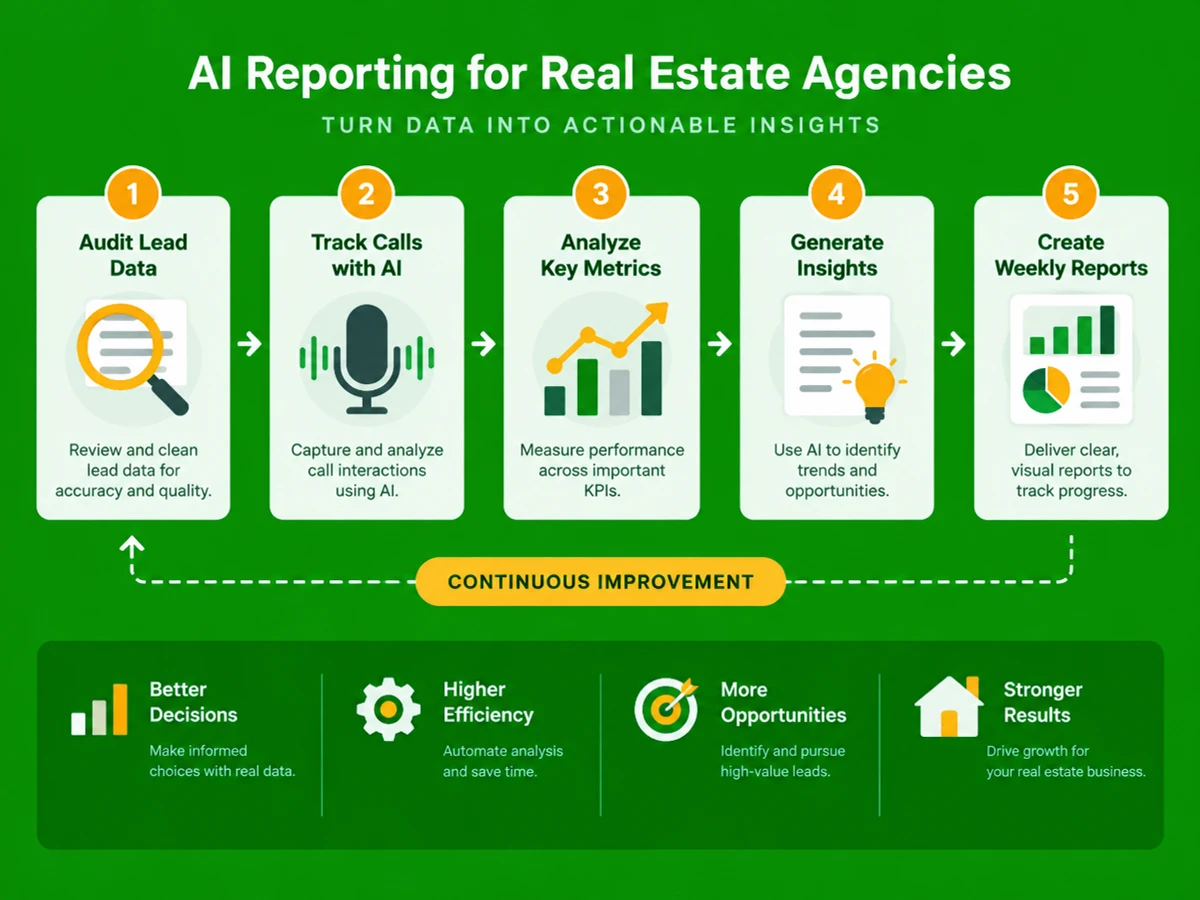
The Process at a Glance

StepActionTimeOutcome
1Audit current lead and call data2-3 daysBaseline numbers for every channel
2Set up AI call tracking and transcription3-5 daysEvery call captured and logged automatically
3Define and track four core KPIs1-2 days setupClear dashboard of lead, call, revenue data
4Build a weekly AI-generated owner's reportOngoing, automatedOne report replaces manual spreadsheet work
5Review insights and act within 48 hours30 min weeklyFaster fixes to underperforming channels or agents

Total time to full implementation: approximately 2-3 weeks. Most agencies have their first complete weekly report by week two.


Step 1: Audit Your Current Lead and Call Data

What You're Doing

Before any tool can give useful answers, you need an honest picture of how leads move through your agency today and where they fall through the cracks.

How to Do It

  1. Pull the last 90 days of inquiries from every source, including property portals, your website, walk-ins, and referrals.
  2. Check how many of those leads received any response, and how long it took.
  3. Count missed or unanswered calls over the same period, separating business hours from after-hours.
  4. Tag each closed deal with its original source to see which channels actually produce revenue, not just volume.

Best Practices

  • Use your CRM's export function instead of agent memory. Self-reported response times are almost always optimistic.
  • Keep "leads contacted" separate from "leads qualified." Raw lead count alone is a vanity metric.

Common Mistakes

Many agencies audit only web leads and ignore phone inquiries. Calls typically represent the highest-intent channel, and they're the ones most likely to go unanswered during peak hours.

What Done Looks Like

You have one spreadsheet showing lead volume, response time, missed call count, and revenue by source for the last quarter. It doesn't have to be perfect. It just has to be a baseline you can measure against later. For a more detailed walkthrough, see I Made an AI Agent That Finds 150+ Real Estate Leads Every ....


Step 2: Set Up AI Call Tracking and Transcription

What You're Doing

Calls are where most real estate deals begin, and where many leads quietly disappear. This step places an AI layer over your phone lines so every interaction is answered, logged, and transcribed automatically.

How to Do It

  1. Choose an AI-powered front-office platform, such as Ezora, that can answer every inbound call, qualify the caller, and route hot leads to an agent in real time.
  2. Connect the platform to your existing phone numbers and CRM so your team doesn't have to learn new software.
  3. Enable call transcription so every conversation becomes searchable text.
  4. Set rules for after-hours and overflow calls, since 62% of inquiries come in outside standard business hours.

Best Practices

  • Test the AI agent with realistic caller scenarios, such as price questions, viewing requests, and rental queries, before going fully live.
  • Keep a human escalation path for complex or high-value callers. AI should qualify and route calls, not replace human judgment on every one.

What Done Looks Like

Every call, day or night, gets answered, logged, and transcribed. Hot leads are flagged for human follow-up within minutes instead of hours. For a more detailed walkthrough, see Best AI Tools for Real Estate Prospecting and Skip Tracing.

Example

ScenarioBefore AI call trackingAfter AI call tracking
Evening inquiry about a 2BHK listingVoicemail, no callback until next morningAI agent answers, qualifies budget, books a viewing slot
Rental tenant asking about maintenanceCall goes unanswered, tenant frustration logged nowhereCall transcribed, routed to property manager with full context

Step 3: Track the Four Core KPIs That Actually Matter

What You're Doing

Dashboards tend to fail because they're crowded with numbers nobody acts on. This step narrows your focus to four metrics that connect directly to revenue.

How to Do It

  1. Lead-to-booking rate: The percentage of qualified leads that convert into a confirmed viewing, appointment, or booking. Industry benchmarks put a healthy lead-to-site-visit ratio at 10-15% of qualified leads.
  2. Missed call rate: The share of inbound calls that go unanswered. CallRail's 2025 Small Business Marketing Benchmark Report, based on 1.1 million leads, found a 9% missed call rate for real estate, with much higher rates during after-hours windows.
  3. Revenue by channel: Closed deal value traced back to its original source, such as a portal, website, referral, or social media. This shows where your marketing budget actually converts.
  4. Agent performance: Response time, contact rate, and appointment-set rate for each agent, reviewed weekly so coaching rests on data instead of impressions.

Example

KPIFormulaWhat "good" looks like
Lead-to-booking rateBookings ÷ Qualified leads × 10010-15% (per industry benchmark data)
Missed call rateUnanswered calls ÷ Total inbound calls × 100Under 9-10%
Revenue by channelClosed value per source ÷ Total revenueNo single channel over-relied upon
Agent performanceResponse time, contact rate, appointments setResponse under 5 minutes

Common Mistakes

Tracking raw lead volume instead of conversion by source is the most common error. Two channels can deliver the same number of leads and produce wildly different revenue.

What Done Looks Like

Within seconds, you can tell which channel produced your last three closed deals and which agent has the fastest response time this month. If you can't answer both questions right now, your current reporting isn't doing its job.

Key Takeaway: Focus on lead-to-booking rate, missed call rate, revenue by channel, and agent performance. These four numbers tie directly to profitability.


Step 4: Build a Weekly AI-Generated Owner's Report

What You're Doing

Once KPIs are defined, the bottleneck becomes the reporting itself. Compiling spreadsheets every Friday eats hours and often arrives late. This step automates the process so insights land on schedule.

How to Do It

  1. Configure your AI platform to compile lead-to-booking rate, missed call rate, revenue by channel, and agent performance into one weekly summary.
  2. Include call transcription highlights so you can spot recurring objections or missed opportunities without listening to every recording.
  3. Set the report to flag anomalies automatically, such as a spike in missed calls or a channel's conversion rate dropping below baseline.
  4. Send the report to owners and team leads on a fixed schedule, such as every Monday morning.

Best Practices

  • Keep the report to one page. A report nobody reads is worse than none.
  • Pair the report with a short, recurring 30-minute review, in line with the weekly tracking rhythm recommended by most industry KPI frameworks.

What Done Looks Like

A single weekly report arrives automatically. It shows where leads came from, how fast they were answered, which ones converted, and which agents need coaching.


Step 5: Review Insights and Act Within 48 Hours

What You're Doing

Good data only pays off when someone acts on it. This final step turns each week's insights into concrete changes before the next reporting cycle begins.

How to Do It

  1. Scan the report for the biggest outlier first, whether that's a spike in missed calls, an underperforming channel, or an agent falling behind on response time.
  2. Assign one owner to fix the single biggest issue that week. Trying to fix everything at once usually fixes nothing.
  3. Shift marketing spend away from channels with low revenue per lead and toward channels with proven booking rates.
  4. Re-check the same KPI the following week to confirm the fix moved the number.

What Done Looks Like

Each week produces at least one measurable operational change. Over time, the same problems stop recurring month after month.


What to Do After Setting Up AI Reporting and Insights

Once the weekly rhythm is running, your priorities shift. Sequence the next few months this way.

Phase 1 (Weeks 1-4): Stabilize the baseline. Confirm the weekly report is accurate, call tracking captures 100% of inbound calls, and your team trusts the numbers before making major decisions based on them.

Phase 2 (Months 2-3): Optimize channel spend and agent coaching. Shift budget toward proven sources, and use agent performance data for targeted coaching instead of blanket training.

Phase 3 (Month 4 onward): Expand tracking to lifecycle metrics. Add post-booking measures like days-on-market, tenant retention, or referral rate to cover the full customer journey.


Resources You'll Need

ResourceRoleRequirementPrice
EzoraAI front-office platform: answers calls, follows up leads, generates weekly owner's reports, call transcription, revenue-by-source analyticsRecommendedCustom, contact for pricing
CallRailCall tracking and attribution by marketing sourceRecommendedPaid, tiered plans
PlectoKPI dashboard visualization for sales teamsOptionalPaid, tiered plans
Your existing CRM (e.g. a real estate-specific CRM)Source of truth for lead and deal recordsRequiredVaries
Spreadsheet (Google Sheets/Excel)Manual baseline audit before automationRequired (Step 1 only)Free

Ezora is built for customer-facing businesses that want automation working quietly inside their existing workflows, with low disruption and quick results. Ezora helps businesses never miss a call or lead with fast, fully integrated AI voice and messaging agents. Setups require no staff retraining and are typically live in about two weeks. See also, see Best AI Tools for Real Estate Firms in 2026: Broker Guide.


Common Plateaus & How to Break Through

Plateau: Reports are generated but nobody acts on them

Likely cause: The report is too long or technical, or no one is responsible for reviewing it weekly.

Fix: Cut the report to the four core KPIs and assign one named person to review it and respond within 48 hours of delivery.

Plateau: Missed call rate stays high despite AI call tracking

Likely cause: After-hours and overflow routing rules were never configured.

Fix: Confirm 24/7 coverage is enabled, then test it with calls placed late in the evening and on weekends. Remember that 62% of inquiries arrive outside standard hours.

Plateau: Revenue-by-channel data looks inconsistent or incomplete

Likely cause: Agents aren't consistently tagging lead sources at entry, so attribution breaks down.

Fix: Make source tagging mandatory at lead intake. Where manual tagging gets skipped, use call transcription to detect source mentions automatically.

Plateau: Lead-to-booking rate isn't improving despite faster response times

Likely cause: Leads are contacted quickly but not properly qualified, so agents spend time on calls that were never going to book.

Fix: Review call transcripts for qualification quality, not just speed, and refine the questions your AI agent or team asks on first contact.

Key Takeaway: Most plateaus come down to four fixes: simplify the report, confirm 24/7 coverage, enforce accurate source tagging, and focus on qualification quality. For more troubleshooting advice, see Which AI tools should a real estate agent actually use ....


Conclusion

AI reporting and insights for real estate agencies aren't about adding more dashboards. They're about tracking the four numbers that predict revenue: lead-to-booking rate, missed call rate, revenue by channel, and agent performance. Agencies that follow this five-step process typically move from reactive guesswork to a weekly rhythm of data-driven decisions within two to three weeks.

Key Takeaways

  • A focused weekly report covering four core KPIs beats a dozen scattered spreadsheets that nobody reviews.
  • Speed and consistency compound. Agencies that respond within 5 minutes convert far more leads than those relying on manual follow-up.
  • Your next step: audit the last 90 days of lead and call data this week, and use it as the baseline for your first AI-generated report.

FAQ

How do I use AI reporting and insights for real estate agencies and what should I track?

Audit your current lead and call data to set a baseline. Then set up an AI platform that answers and transcribes every call. Track four core KPIs: lead-to-booking rate, missed call rate, revenue by channel, and agent performance. Combine them into one automated weekly report, and act on it within 48 hours.

What KPIs should a real estate agency track with AI reporting tools?

The four essential Key Performance Indicators (KPIs) are lead-to-booking rate, missed call rate, revenue by marketing channel, and individual agent performance (including response time, contact rate, and appointments set). These connect directly to revenue, unlike vanity metrics such as raw lead count.

How much does AI reporting for real estate agencies cost?

Costs depend on the platform and agency size. AI front-office tools for call tracking and transcription typically run on tiered monthly plans. Dedicated platforms such as Ezora offer custom pricing based on call volume and needed features.

Why is missed call rate such an important metric to track?

Missed calls are lost revenue that never reaches your CRM as a recorded lead. CallRail's 2025 benchmark research found a 9% missed call rate for real estate, and unanswered callers rarely call back on their own.

How quickly should a real estate agency respond to a new lead?

Respond within 5 minutes. The MIT and InsideSales.com Lead Response Management Study found that agents who respond within 5 minutes are 21 times more likely to qualify a lead than those who wait 30 minutes.

Can AI reporting replace my real estate CRM?

No. AI reporting tools are designed to sit on top of your existing CRM and phone system. Platforms like Ezora integrate without requiring your team to learn new software.

How do I track revenue by lead source accurately?

Tag every lead with its original source at intake. Make attribution mandatory, use call transcription to catch source mentions when tagging is missed, and link closed deals back to that original tag.

What does a good weekly AI owner's report include for a real estate agency?

A good report fits on one page. It covers lead-to-booking rate, missed call rate, revenue by channel, and agent performance, plus flagged anomalies such as a sudden drop in conversion or a spike in missed calls. It should arrive automatically on a fixed schedule.

This guide was compiled from publicly available industry research, including studies cited by Inman, NAR, MIT/InsideSales.com, CallRail, and independent real estate analytics publishers, alongside documented product capabilities. Figures and benchmarks reflect data available as of October 2026 and may shift as markets and tools evolve. Agencies should validate performance against their own tracked data.

Missing calls after hours?

Book a 20-minute call. We'll show you where leads slip through and what an AI front office would answer, book and follow up for you.

Book a call
Social Share
Add as a preferred source on Google
Social Share
Add as a preferred source on Google
Ezora logoEzora

Every call answered. Every lead followed up.

Book a 20-minute call to see what Ezora's AI agents can do for you.

Book a callVisit ezora.co